Refresh AZ-103 Samples 2021
Cause all that matters here is passing the Microsoft AZ-103 exam. Cause all that you need is a high score of AZ-103 Microsoft Azure Administrator exam. The only one thing you need to do is downloading Certleader AZ-103 exam study guides now. We will not let you down with our money-back guarantee.
Online AZ-103 free questions and answers of New Version:
NEW QUESTION 1
You have an Azure subscription that contains a policy-based virtual network gateway named GW1 and a virtual network named VNet1. You need to ensure that you can configure a point-to-site connection from VNet1 to an on-premises computer. Which two actions should you perform? Each correct answer presents part of the solution.
NOTE: Each correct selection is worth one point.
- A. Reset GW1.
- B. Add a service endpoint to VNet1.
- C. Add a connection to GW1.
- D. Add a public IP address space to VNet1.
- E. Delete GWL
- F. Create a route-based virtual network gateway.
Answer: EF
Explanation:
E: Policy-based VPN devices use the combinations of prefixes from both networks to define how traffic is encrypted/decrypted through IPsec tunnels. It is typically built on firewall devices that perform packet filtering. IPsec tunnel encryption and decryption are added to the packet filtering and processing engine.
F: A VPN gateway is used when creating a VPN connection to your on-premises network.
Route-based VPN devices use any-to-any (wildcard) traffic selectors, and let routing/forwarding tables direct traffic to different IPsec tunnels. It is typically built on router platforms where each IPsec tunnel is modeled as a network interface or VTI (virtual tunnel interface).
Incorrect Answers:
D: Point-to-Site connections do not require a VPN device or a public-facing IP address. References:
https://docs.microsoft.com/en-us/azure/vpn-gateway/create-routebased-vpn-gateway-portal https://docs.microsoft.com/en-us/azure/vpn-gateway/vpn-gateway-connect-multiple-policybased-rm- ps
NEW QUESTION 2
You have an Azure Service Bus.
You need to implement a Service Bus queue that guarantees first in first-out (FIFO)
delivery of messages. What should you do?
- A. Set the Lock Duration setting to 10 seconds.
- B. Enable duplicate detection.
- C. Set the Max Size setting of the queue to 5 GB.
- D. Enable partitioning.
- E. Enable sessions.
Answer: E
Explanation:
Through the use of messaging sessions you can guarantee ordering of messages, that is first-in-first- out (FIFO) delivery of messages.
References:
https://docs.microsoft.com/en-us/azure/service-bus-messaging/service-bus-azure-and-service-bus- queues-compared-contrasted
NEW QUESTION 3
You plan to connect a virtual network named VNET1017 to your on-premises network by using both an Azure ExpressRoute and a site-to-site VPN connection.
You need to prepare the Azure environment for the planned deployment. The solution must maximize the IP address space available to Azure virtual machines.
What should you do from the Azure portal before you create the ExpressRoute are the VPN gateway?
- A. Mastered
- B. Not Mastered
Answer: A
Explanation:
We need to create a Gateway subnet Step 1:
Go to More Services > Virtual Networks Step 2:
Then click on the VNET1017, and click on subnets. Then click on gateway subnet. Step 3:
In the next window define the subnet for the gateway and click OK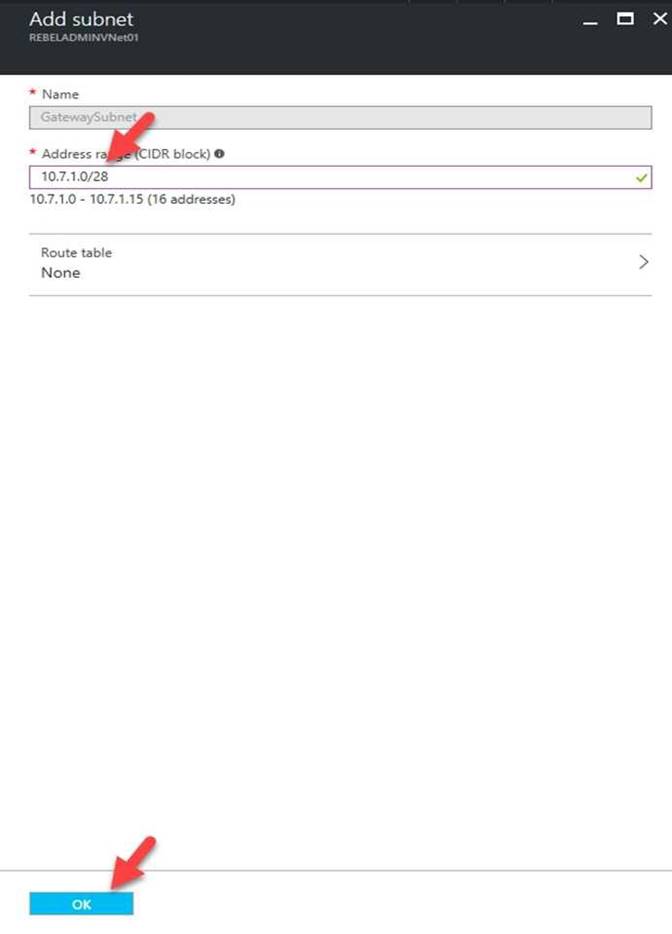
It is recommended to use /28 or /27 for gateway subnet.
As we want to maximize the IP address space we should use /27. References:
https://blogs.technet.microsoft.com/canitpro/2021/06/28/step-by-step-configuring-a-site-to-site-vpn- gateway-between-azure-and-on-premise/
NEW QUESTION 4
HOTSPOT
You have an Azure subscription named Subscription1. Subscription1 contains the virtual machines in the following table.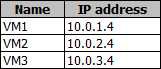
Subscription1 contains a virtual network named VNet1 that has the subnets in the following table.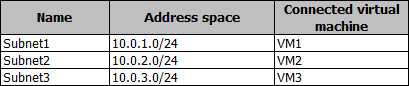
VM3 has a network adapter named NIC3. IP forwarding is enabled on NIC3. Routing is enabled on VM3.
You create a route table named RT1. RT1 is associated to Subnet1 and Subnet2 and contains the routes in the following table.
You apply RT1 to Subnet1.
For each of the following statements, select Yes if the statement is true. Otherwise, select No.
NOTE: Each correct selection is worth one point.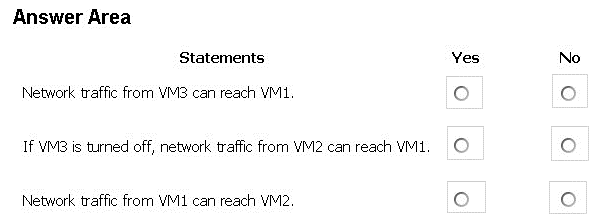
- A. Mastered
- B. Not Mastered
Answer: A
Explanation:
Box 1: Yes
Traffic from VM1 and VM2 can reach VM3 thanks to the routing table, and as IP forwarding is enabled on VM3, traffic from VM3 can reach VM1.
Box 2: No
VM3, which has IP forwarding, must be turned on, in order for traffic from VM2 to reach VM1. Box 3: Yes
The traffic from VM1 will reach VM3, which thanks to IP forwarding, will send the traffic to VM2.
References: https://www.quor a.com/What-is-IP-forwarding
NEW QUESTION 5
You have an Azure subscription that contains a virtual network named VNet1. VNet 1 has two subnets named Subnet1 and Subnet2. VNet1 is in the West Europe Azure region.
The subscription contains the virtual machines in the following table.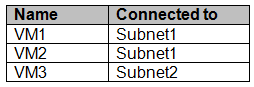
You need to deploy an application gateway named AppGW1 to VNet1. What should you do first?
- A. Add a service endpoint.
- B. Add a virtual network.
- C. Move VM3 to Subnet1.
- D. Stop VM1 and VM2.
Answer: D
Explanation:
If you have an existing virtual network, either select an existing empty subnet or create a new subnet in your existing virtual network solely for use by the application gateway.
Verify that you have a working virtual network with a valid subnet. Make sure that no virtual machines or cloud deployments are using the subnet. The application gateway must be by itself in a virtual network subnet.
References:
https://social.msdn.microsoft.com/Forums/azure/en-US/b09367f9-5d01-4cda-9127- b7a506a0a151/cant-create-application-gateway?forum=WAVirtualMachinesVirtualNetwork https://docs.microsoft.com/en-us/azure/application-gateway/application-gateway-create-gateway
NEW QUESTION 6
You are the global administrator for an Azure Active Directory (Azure AD) tenet named adatum.com. You need to enable two-step verification for Azure users.
What should you do?
- A. Create a sign-in risk policy in Azure AD Identity Protection
- B. Enable Azure AD Privileged Identity Management.
- C. Create and configure the Identity Hub.
- D. Configure a security policy in Azure Security Center.
Answer: A
Explanation:
With Azure Active Directory Identity Protection, you can:
require users to register for multi-factor authentication
handle risky sign-ins and compromised users References:
https://docs.microsoft.com/en-us/azure/active-directory/identity-protection/flows
NEW QUESTION 7
Note: This question is part of a series of questions that present the same scenario. Each question in the series contains a unique solution that might meet the stated goals. Some question sets might have more than one correct solution, while others might not have a correct solution.
After you answer a question in this section, you will NOT be able to return to it As a result, these questions will not appear in the review screen.
You have an Azure Active Directory (Azure AD) tenant named Adatum and an Azure Subscript contains a resource group named Dev.d Subscription1. Adatum contains a group named Developers. Subscription!
You need to provide the Developers group with the ability to create Azure logic apps in the; Dev, resource group.
Solution: On Dev, you assign the Logic App Contributor role to the Developers group.
Does this meet the goal?
- A. Yes
- B. No
Answer: A
Explanation:
The Logic App Contributor role lets you manage logic app, but not access to them. It provides access to view, edit, and update a logic app.
References:
https://docs.microsoft.com/en-us/azure/role-based-access-control/built-in-roles https://docs.microsoft.com/en-us/azure/logic-apps/logic-apps-securing-a-logic-app
NEW QUESTION 8
HOTSPOT
You have an Azure subscription named Subscription1.
You enable Azure Active Directory (AD) Privileged Identity Management.
From Azure AD Privileged Identity Management, you configure the Global Administrator role for the Azure Active Directory (Azure AD) tenant as shown in the Role settings exhibit. (Click the Exhibit tab.)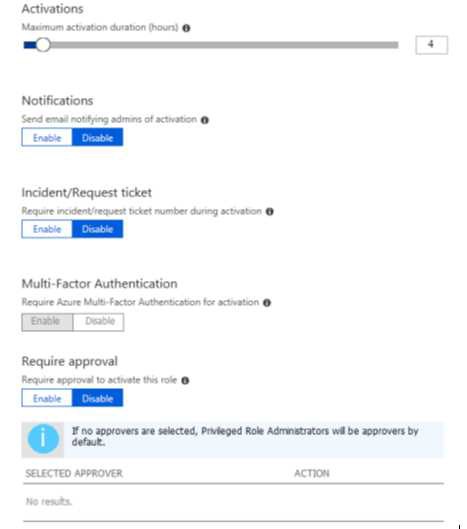
From Azure AD Privileged Identity Management, you configure the global administrators as shown in
the Members exhibit. (Click the Exhibit tab.)
User2 activates the Global Administrator role on July 16, 2021, at 10:00, as shown in the Activation exhibit. (Click the Exhibit tab.)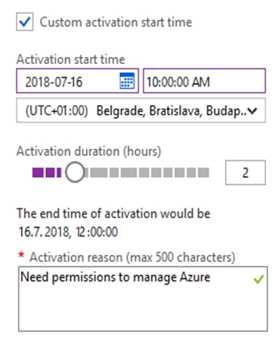
For each of the following statements, select Yes if the statement is true. Otherwise, select No.
NOTE: Each correct selection is worth one point.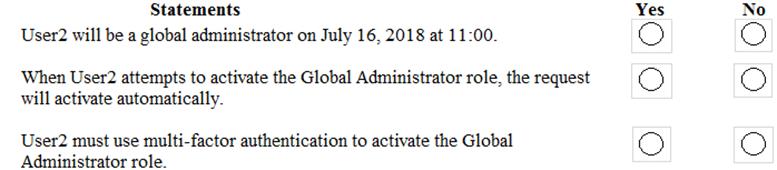
- A. Mastered
- B. Not Mastered
Answer: A
Explanation: 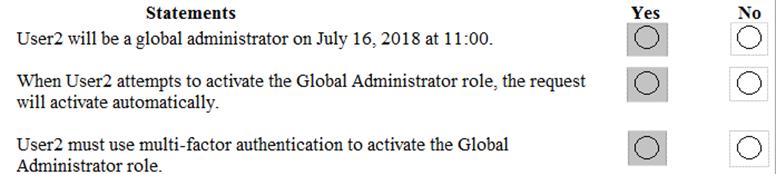
NEW QUESTION 9
You have an Azure App Service plan named AdatumASP1 that hosts several Azure web apps. You discover that the web apps respond slowly.
You need to provide additional memory and CPU resources to each instance of the web app. What should you do?
- A. Scale out AdatumASP1.
- B. Add continuous WebJobs that use the multi-instance scale.
- C. Scale up AdatumASP1.
- D. Add a virtual machine scale set.
Answer: C
Explanation:
References:
https://github.com/MicrosoftDocs/azure-docs/blob/master/articles/app-service/web-sites-scale.md
NEW QUESTION 10
DRAG DROP
You have an availability set named AS1 that contains three virtual machines named VM1, VM2, and
VM3.
You attempt to reconfigure VM1 to use a larger size. The operation fails and you receive an allocation failure message.
You need to ensure that the resize operation succeeds.
Which three actions should you perform in sequence? To answer, move the appropriate actions from the list of actions to the answer area and arrange them in the correct order.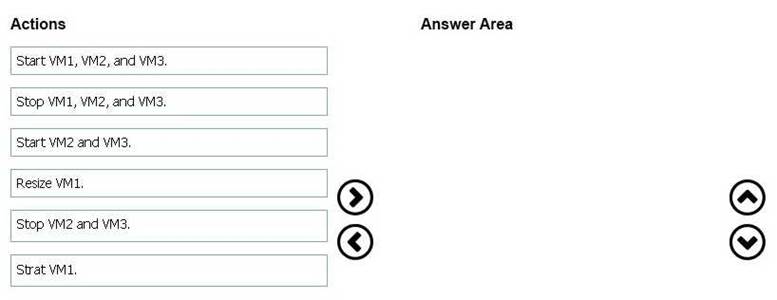
- A. Mastered
- B. Not Mastered
Answer: A
Explanation: 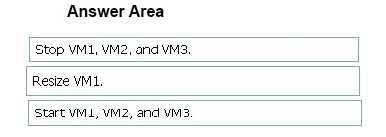
NEW QUESTION 11
DRAG DROP
You have an Azure subscription named Subscription1.
You create an Azure Storage account named contosostorage, and then you create a file share named data.
Which UNC path should you include in a script that references files from the data file share? To answer, drag the appropriate values to the correct targets. Each value may be used once, more than once, or not at all. You may need to drag the split bar between panes or scroll to view content.
NOTE: Each correct selection is worth one point.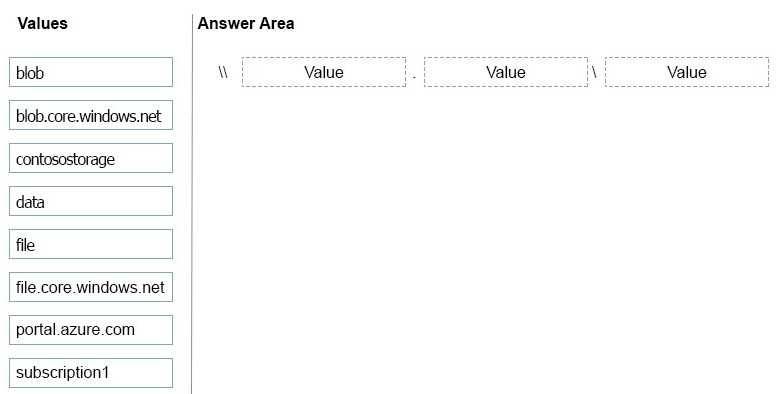
- A. Mastered
- B. Not Mastered
Answer: A
Explanation:
Box 1: contosostorage The name of account
Box 2: file.core.windows.net
Box 3: data
The name of the file share is data. Example: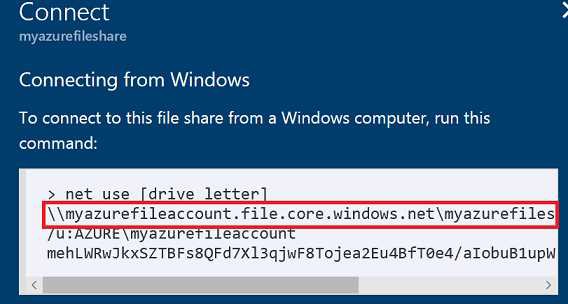
References: https://docs.microsoft.com/en-us/azure/storage/files/storage-how-to-use-files-windows
NEW QUESTION 12
You have an Azure subscription named Subscription1.
You have 5 TB of data that you need to transfer to Subscription. You plan to use an Azure Import/Export job.
What can you use as the destination of the imported data?
- A. Azure SQL Database
- B. Azure Data Factory
- C. A virtual machine
- D. Azure Blob storage
Answer: D
Explanation:
References:
https://docs.microsoft.com/en-us/azure/storage/common/storage-import-export-service
NEW QUESTION 13
You have an Azure subscription named Subscription1 that contains two Azure virtual networks named
VNet1 and VNet2. VNet1 contains a VPN gateway named VPNGW1 that uses static routing. There is a site-to-site VPN connection between your on-premises network and VNet1.
On a computer named Client1 that runs Windows10, you configure a point-to-site VPN connection to VNet1.
You configure virtual network peering between VNet1 and VNet2. You verify that you can connect to VNet2 from the on-premises network. Client1 is unable to connect to VNet2.
You need to ensure that you can connect Client1 to VNet2. What should you do?
- A. Select Allow gateway transit on VNet2.
- B. Enable BGP on VPNGW1.
- C. Select Allow gateway transit on VNet1.
- D. Download and re-install the VPN client configuration package on Client1.
Answer: D
Explanation:
References:
https://docs.microsoft.com/en-us/azure/vpn-gateway/vpn-gateway-about-point-to-site-routing
NEW QUESTION 14
You download an Azure Resource Manager template based on an existing virtual machine. The template will be used to deploy 100 virtual machines.
You need to modify the template to reference an administrative password. You must prevent the password from being stored in plain text.
What should you create to store the password?
- A. Azure Active Directory (AD) Identity Protection and an Azure policy
- B. a Recovery Services vault and a backup policy
- C. an Azure Key Vault and an access policy
- D. an Azure Storage account and an access policy
Answer: C
Explanation:
You can use a template that allows you to deploy a simple Windows VM by retrieving the password that is stored in a Key Vault. Therefore the password is never put in plain text in the template parameter file.
References: https://azure.microsoft.com/en-us/resources/templates/101-vm-secure-password/
NEW QUESTION 15
You deploy an Azure Application Gateway.
You need to ensure that all the traffic requesting https://adatum.com/internal resources is directed to an internal server pool and all the traffic requesting https://adatum.com/external resources is directed to an external server pool.
What should you configure on the Application Gateway?
- A. URL path-based routing
- B. multi-site listeners
- C. basic routing
- D. SSL termination
Answer: A
NEW QUESTION 16
DRAG DROP
You have an Azure subscription that contains an Azure file share.
You have an on-premises server named Server1 that runs Windows Server 2021. You plan to set up Azure File Sync between Server1 and the Azure file share.
You need to prepare the subscription for the planned Azure File Sync.
Which two actions should you perform in the Azure subscription? To answer, drag the appropriate actions to the correct targets. Each action may be used once, more than once, or not at all. You may need to drag the split bar between panes or scroll to view content.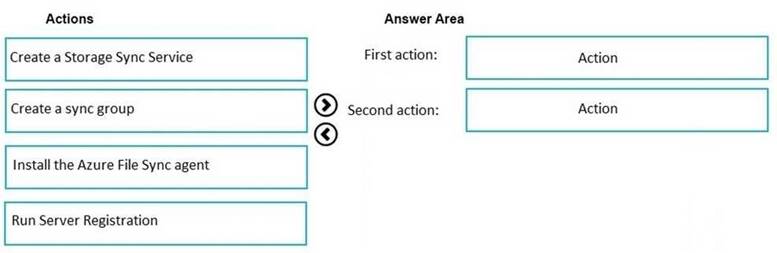
- A. Mastered
- B. Not Mastered
Answer: A
Explanation:
First action: Create a Storage Sync Service
The deployment of Azure File Sync starts with placing a Storage Sync Service resource into a resource group of your selected subscription.
Second action: Run Server Registration
Registering your Windows Server with a Storage Sync Service establishes a trust relationship between your server (or cluster) and the Storage Sync Service. A server can only be registered to one Storage Sync Service and can sync with other servers and Azure file shares associated with the same Storage Sync Service.
The Server Registration UI should open automatically after installation of the Azure File Sync agent.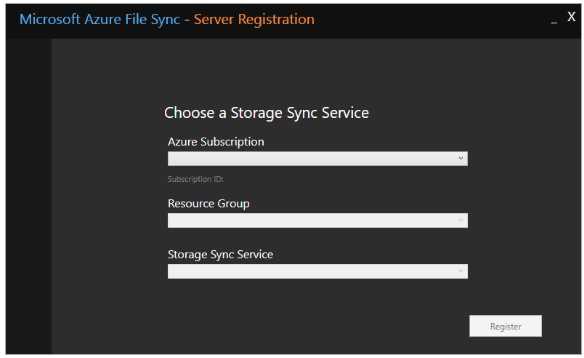
Incorrect Answers:
Not Install the Azure File Sync agent: The Azure File Sync agent is a downloadable package that enables Windows Server to be synced with an Azure file share.
NEW QUESTION 17
You have an on-premises network that contains a Hyper-V host named Host1. Host1 runs Windows Server 2021 and hosts 10 virtual machines that run Windows Server 2021.
You plan to replicate the virtual machines to Azure by using Azure Site Recovery. You create a Recovery Services vault named ASR1 and a Hyper-V site named Site1.
You need to add Host1 to ASR1. What should you do?
- A. Download the installation file for the Azure Site Recovery Provide
- B. Download the vault registration key.Install the Azure Site Recovery Provider on Host1 and register the server.
- C. Download the installation file for the Azure Site Recovery Provide
- D. Download the storage account key.Install the Azure Site Recovery Provider on Host1 and register the server.
- E. Download the installation file for the Azure Site Recovery Provide
- F. Download the vault registration key.Install the Azure Site Recovery Provider on each virtual machine and register the virtual machines.
- G. Download the installation file for the Azure Site Recovery Provide
- H. Download the storage account key.Install the Azure Site Recovery Provider on each virtual machine and register the virtual machines.
Answer: A
Explanation:
Download the Vault registration key. You need this when you install the Provider. The key is valid for five days after you generate it.
Install the Provider on each VMM server. You don't need to explicitly install anything on Hyper-V hosts.
Incorrect Answers:
B, D: Use the Vault Registration Key, not the storage account key. References:
https://docs.microsoft.com/en-us/azure/site-recovery/migrate-tutorial-on-premises-azure
NEW QUESTION 18
DRAG DROP
You have an on-premises network that you plan to connect to Azure by using a site-to-site VPN.
In Azure, you have an Azure virtual network named VNet1 that uses an address space of 10.0.0.0/16. VNet1 contains a subnet named Subnet1 that uses an address space of 10.0.0.0/24.
You need to create a site-to-site VPN to Azure.
Which four actions should you perform in sequence? To answer, move the appropriate actions from the list of actions to the answer area and arrange them in the correct order.
NOTE: More than one order of answer choices is correct. You will receive credit for any of the correct orders you select.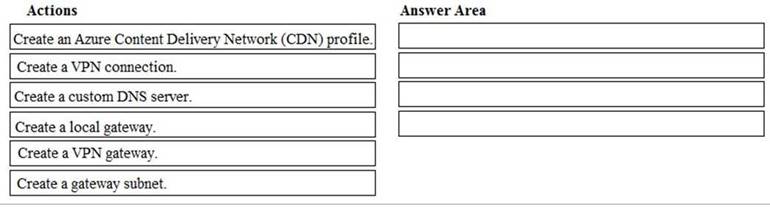
- A. Mastered
- B. Not Mastered
Answer: A
Explanation:
Note: More than one order of answer choices is correct.
Creating a local gateway (a logical object that represents the on-premise router) can be done at step 1, step 2 or step 3. The other three steps must be done in order: create gateway subnet then create VPN gateway then create the VPN connection. The VPN connection is a connection between the VPN gateway and the Local gateway.
NEW QUESTION 19
You need to meet the user requirement for Admin1. What should you do?
- A. From the Subscriptions blade, select the subscription, and then modify the Properties.
- B. From the Subscriptions blade, select the subscription, and then modify the Access control (IAM) settings.
- C. From the Azure Active Directory blade, modify the Properties.
- D. From the Azure Active Directory blade, modify the Groups.
Answer: A
Explanation:
Change the Service administrator for an Azure subscription
1. Sign in to Account Center as the Account administrator.
2. Select a subscription.
3. On the right side, select Edit subscription details.
Scenario: Designate a new user named Admin1 as the service administrator of the Azure subscription.
References: https://docs.microsoft.com/en-us/azure/billing/billing-add-change-azure-subscription- administrator
NEW QUESTION 20
You need to configure AG1. What should you create?
- A. a multi-site listener
- B. a URL path-based routing rule
- C. a basic listener
- D. a basic routing rule
Answer: B
Explanation:
References:
https://docs.microsoft.com/en-us/azure/application-gateway/application-gateway-create-url-route- portal
NEW QUESTION 21
Note: This question is part of a series of questions that present the same scenario. Each question in the series contains a unique solution that might meet the stated goals. Some question sets might have more than one correct solution, while others might not have a correct solution.
After you answer a question in this section, you will NOT be able to return to it As a result these questions will not appear in the review screen.
You have an Azure wet) app named Appl. App1 runs in an Azure App Service plan named Plan1. Plan1 is associated to the Free pricing tier.
You discover that App1 stops each day after running continuously for 60 minutes. You need to ensure that App1 can run continuously for the entire day.
Solution: You change the pricing tier of Plan1 to Shared. Does this meet the goal?
- A. Yes
- B. No
Answer: B
Explanation:
You should switch to the Basic Tier.
The Free Tier provides 60 CPU minutes / day. This explains why App1 is stops. The Shared Tier provides 240 CPU minutes / day. The Basic tier has no such cap.
References:
https://azure.microsoft.com/en-us/pricing/details/app-service/windows/
NEW QUESTION 22
You have two subscriptions named Subscription1 and Subscription2. Each subscription is associated to a different Azure AD tenant.
Subscription1 contains a virtual network named VNet1.VNet1 contains an Azure virtual machine named VM1 and has an IP address space of 10.0.0.0/16.
Subscription2 contains a virtual network named VNet2. VNet2 contains an Azure virtual machine named VM2 and has an IP address space of 10.10.0.0/24.
You need to connect VNet1 to VNet2. What should you do first?
- A. Move VNet1 to Subscription2.
- B. Modify the IP address space of VNet2.
- C. Provision virtual network gateways.
- D. Move VM1 to Subscription2.
Answer: C
Explanation:
The virtual networks can be in the same or different regions, and from the same or different subscriptions. When connecting VNets from different subscriptions, the subscriptions do not need to be associated with the same Active Directory tenant.
Configuring a VNet-to-VNet connection is a good way to easily connect VNets. Connecting a virtual network to another virtual network using the VNet-to-VNet connection type (VNet2VNet) is similar to
creating a Site-to-Site IPsec connection to an on-premises location. Both connectivity types use a VPN gateway to provide a secure tunnel using IPsec/IKE, and both function the same way when communicating.
The local network gateway for each VNet treats the other VNet as a local site. This lets you specify additional address space for the local network gateway in order to route traffic.
References: https://docs.microsoft.com/en-us/azure/vpn-gateway/vpn-gateway-howto-vnet-vnet- resource-manager-portal
NEW QUESTION 23
Note: This question is part of a series of questions that present the same scenario. Each question in the series contains a unique solution that might meet the stated goals. Some question sets might have more than one correct solution, while others might not have a correct solution.
After you answer a question in this section, you will NOT be able to return to it. As a result, these questions will not appear in the review screen.
You have an Azure Active Directory (Azure AD) tenant named Adatum and an Azure Subscription named Subscription1. Adatum contains a group named Developers. Subscription1 contains a resource group named Dev.
You need to provide the Developers group with the ability to create Azure logic apps in the Dev resource group.
Solution: On Subscription1, you assign the DevTest Labs User role to the Developers group. Does this meet the goal?
- A. Yes
- B. No
Answer: B
Explanation:
DevTest Labs User role only lets you connect, start, restart, and shutdown virtual machines in your Azure DevTest Labs.
You would need the Logic App Contributor role. References:
https://docs.microsoft.com/en-us/azure/role-based-access-control/built-in-roles https://docs.microsoft.com/en-us/azure/logic-apps/logic-apps-securing-a-logic-app
NEW QUESTION 24
You have an Azure subscription named Subscription1 that is used be several departments at your company. Subscription1 contains the resources in the following table: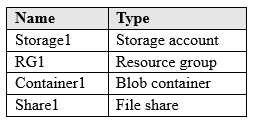
Another administrator deploys a virtual machine named VM1 and an Azure Storage account named Storage2 by using a single Azure Resource Manager template.
You need to view the template used for the deployment.
From which blade can you view the template that was used for the deployment?
- A. RG1
- B. VM1
- C. Storage1
- D. Container1
Answer: A
Explanation:
1. View template from deployment history
Go to the resource group for your new resource group. Notice that the portal shows the result of the last deployment. Select this link.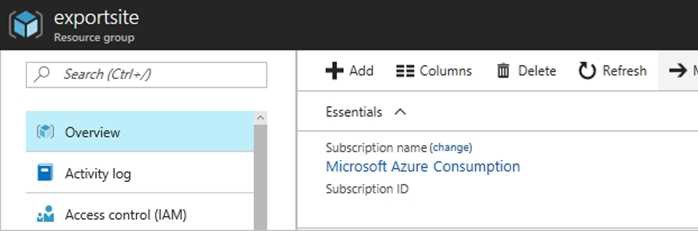
2. You see a history of deployments for the group. In your case, the portal probably lists only one deployment. Select this deployment.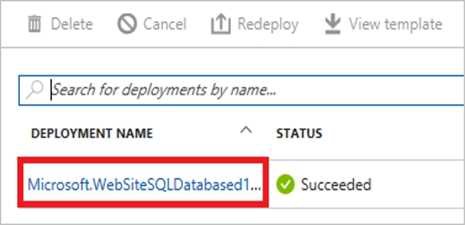
The portal displays a summary of the deployment. The summary includes the status of the
deployment and its operations and the values that you provided for parameters. To see the template that you used for the deployment, select View template.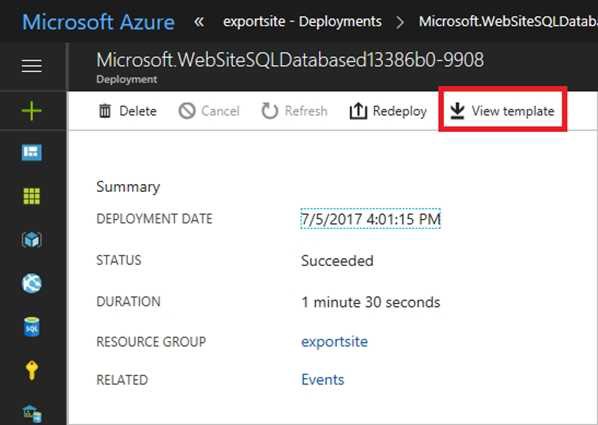
References: https://docs.microsoft.com/en-us/azure/azure-resource-manager/resource-manager-export-template
NEW QUESTION 25
You have two Azure Active Directory (Azure AD) tenants named contoso.com and fabrikam.com. You have a Microsoft account that you use to sign in to both tenants.
You need to configure the default sign-in tenant for the Azure portal. What should you do?
- A. From the Azure portal, configure the portal settings.
- B. From the Azure portal, change the directory.
- C. From Azure Cloud Shell, run Set-AzureRmContext.
- D. From Azure Cloud Shell, run Set-AzureRmSubscription.
Answer: B
Explanation:
Change the subscription directory in the Azure portal.
The classic portal feature Edit Directory, that allows you to associate an existing subscription to your
Azure Active Directory (AAD), is now available in Azure portal. It used to be available only to Service Admins with Microsoft accounts, but now it's available to users with AAD accounts as well.
To get started:
1. Go to Subscriptions.
2. Select a subscription.
3. Select Change directory. Incorrect Answers:
C: The Set-AzureRmContext cmdlet sets authentication information for cmdlets that you run in the current session. The context includes tenant, subscription, and environment information.
References: https://azure.microsoft.com/en-us/updates/edit-directory-now-in-new-portal/
NEW QUESTION 26
HOTSPOT
You have a virtual network named VNet1 that has the configuration shown in the following exhibit.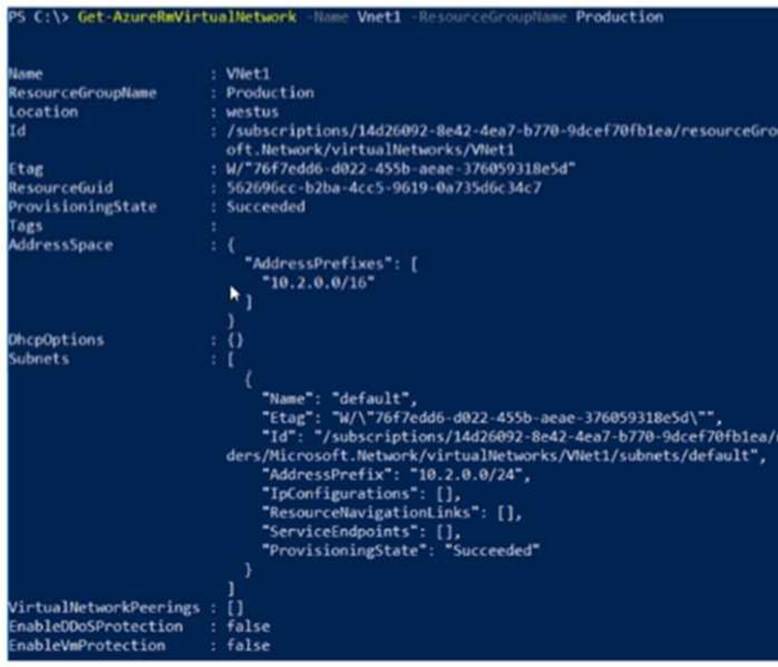
Use the drop-down menus to select the answer choice that completes each statement based on the
information presented in the graphic.
NOTE: Each correct selection is worth one point.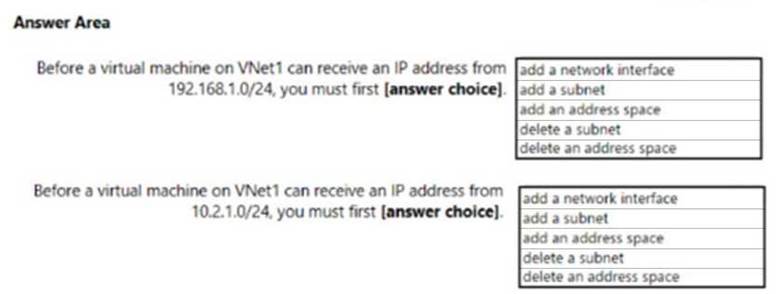
- A. Mastered
- B. Not Mastered
Answer: A
Explanation:
Box 1: add a subnet
Your IaaS virtual machines (VMs) and PaaS role instances in a virtual network automatically receive a private IP address from a range that you specify, based on the subnet they are connected to. We need to add the 192.168.1.0/24 subnet.
Box 2: add a network interface
The 10.2.1.0/24 network exists. We need to add a network interface.
References: https://docs.microsoft.com/en-us/azure/virtual-network/virtual-networks-static-private-ip- arm-pportal
NEW QUESTION 27
DRAG DROP
You are developing an Azure web app named WebApp1. WebApp1 uses an Azure App Service plan named Plan1 that uses the B1 pricing tier.
You need to configure WebApp1 to add additional instances of the app when CPU usage exceeds 70 percent for 10 minutes.
Which three actions should you perform in sequence? To answer, move the appropriate actions from the list of actions to the answer area and arrange them in the correct order.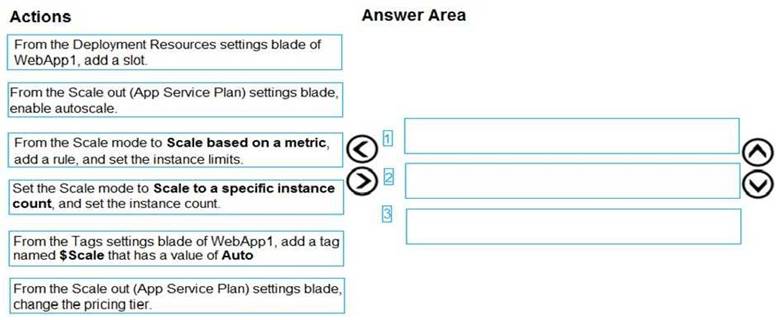
- A. Mastered
- B. Not Mastered
Answer: A
Explanation:
Box 1: From the Scale out (App Service Plan) settings blade, change the pricing tier The B1 pricing tier only allows for 1 core. We must choose another pricing tier.
Box 2: From the Scale out (App Service Plan) settings blade, enable autoscale
1. Log in to the Azure portal at http://portal.azure.com
2. Navigate to the App Service you would like to autoscale.
3. Select Scale out (App Service plan) from the menu
4. Click on Enable autoscale. This activates the editor for scaling rules.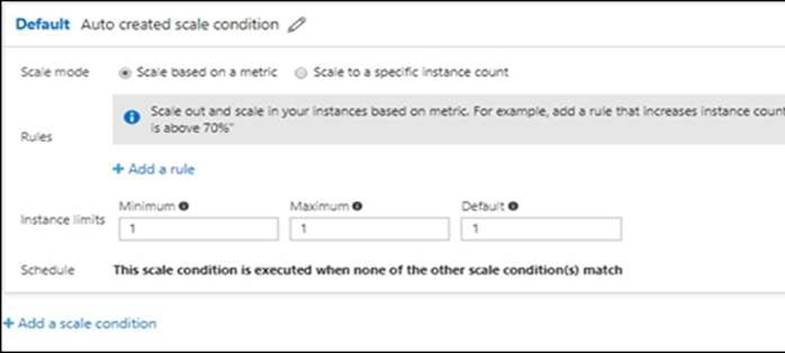
Box 3: From the Scale mode to Scale based on metric, add a rule, and set the instance limits.
Click on Add a rule. This shows a form where you can create a rule and specify details of the scaling. References:
https://azure.microsoft.com/en-us/pricing/details/app-service/windows/ https://blogs.msdn.microsoft.com/hsirtl/2021/07/03/autoscaling-azure-web-apps/
NEW QUESTION 28
You have an Azure subscription that contains the resources in the following table.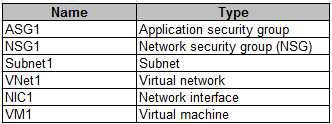
Subnet1 is associated to VNet1. NIC1 attaches VM1 to Subnet1. You need to apply ASG1 to VM1.
What should you do?
- A. Modify the properties of NSG1.
- B. Modify the properties of ASG1.
- C. Associate NIC1 to ASG1.
Answer: B
Explanation:
When you deploy VMs, make them members of the appropriate ASGs. You associate the ASG with a subnet.
References: https://azure.microsoft.com/en-us/blog/applicationsecuritygroups/
NEW QUESTION 29
You plan to deploy an application getaway named appgw1015 to load balance IP traffic to the Azure virtual machines connected to subnet0.
You need to configure a virtual network named VNET1015 to support the planned application gateway.
What should you do from the Azure portal?
- A. Mastered
- B. Not Mastered
Answer: A
Explanation:
Step 1:
Click Networking, Virtual Network, and select VNET1015. Step 2:
explanation below.
Click Subnets, and Click +Add on the VNET1015 - Subnets pane that appears. Step 3:
On the Subnets page, click +Gateway subnet at the top to open the Add subnet page.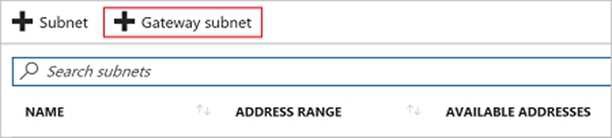
Step 4:
Locate subnet0 and add it. References:
https://docs.microsoft.com/en-us/azure/vpn-gateway/vpn-gateway-howto-site-to-site-resource- manager-portal
NEW QUESTION 30
......
Thanks for reading the newest AZ-103 exam dumps! We recommend you to try the PREMIUM prep-labs.com AZ-103 dumps in VCE and PDF here: https://www.prep-labs.com/dumps/AZ-103/ (303 Q&As Dumps)