The Updated Guide To N10-008 Exam Answers
Proper study guides for Update CompTIA CompTIA Network+Exam certified begins with CompTIA N10-008 preparation products which designed to deliver the High value N10-008 questions by making you pass the N10-008 test at your first time. Try the free N10-008 demo right now.
CompTIA N10-008 Free Dumps Questions Online, Read and Test Now.
NEW QUESTION 1
A network engineer designed and implemented a new office space with the following characteristics: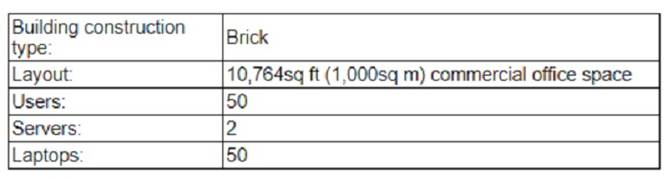
One month after the office space was implemented, users began reporting dropped signals when entering another room and overall poor connections to the 5GHz network. 'which of the following should the engineer do to best resolve the issue?
- A. use non-overlapping channels
- B. Reconfigure the network to support 2.4GHz_
- C. Upgrade to WPA3.
- D. Change to directional antennas-
Answer: D
Explanation:
The best solution to resolve the issue of dropped signals and poor connections to the 5GHz network is to change to directional antennas. Directional antennas are antennas that focus the wireless signal in a specific direction, increasing the range and strength of the signal. Directional antennas are suitable for environments where there are obstacles or interference that can weaken or block the wireless signal. In the image, the office space has several walls and doors that can reduce the signal quality of the 5GHz network, which has a shorter wavelength and higher frequency than the 2.4GHz network. By using directional antennas, the network engineer can aim the wireless signal towards the desired areas and avoid the signal loss caused by the walls and doors. References: CompTIA Network+ N10-008 Certification Study Guide, page 76; The Official CompTIA Network+ Student Guide (Exam N10-008), page 2-19.
NEW QUESTION 2
An AP uses a 98ft (30m) Cat 6 cable to connect to an access switch. The cable is wired through a duct close to a three-phase motor installation. Anytime the three-phase is turned on, all users connected to the switch experience high latency on the network. Which Of the following is MOST likely the cause Of the issue?
- A. Interference
- B. Attenuation
- C. Open circuit
- D. Short circuit
Answer: A
Explanation:
Interference is a phenomenon that occurs when unwanted signals or noise affect the transmission or reception of data signals on a network. Interference can cause network issues such as high latency, low throughput, packet loss, or errors. Interference can be caused by various sources, such as electromagnetic fields, radio waves, power lines, or electrical devices. In this scenario, the three-phase motor installation is a source of interference that affects the Cat 6 cable that connects the AP to the access switch. The cable is wired through a duct close to the motor installation, which exposes it to the electromagnetic fields generated by the motor. Anytime the motor is turned on, the interference causes high latency for all users connected to the switch.
NEW QUESTION 3
Which of the following DNS records works as an alias to another record?
- A. AAAA
- B. CNAME
- C. MX
- D. SOA
Answer: B
Explanation:
The DNS record that works as an alias to another record is called CNAME (Canonical Name). CNAME records are used to create an alias for a domain name that points to another domain name.
References:
✑ CompTIA Network+ Certification Study Guide, Exam N10-007, Fourth Edition, Chapter 2: The OSI Model and Networking Protocols, Objective 2.3: Given a scenario, implement and configure the appropriate addressing schema.
NEW QUESTION 4
Which of the following redundant devices creates broadcast storms when connected together on a high-availability network?
- A. Switches
- B. Routers
- C. Access points
- D. Servers
Answer: A
Explanation:
Switches are devices that forward data based on MAC addresses. They create separate collision domains for each port, which reduces the chance of collisions on the network. However, if multiple switches are connected together without proper configuration, they can create broadcast storms, which are situations where broadcast frames are endlessly forwarded between switches, consuming network bandwidth and resources. Broadcast storms can be prevented by using protocols such as Spanning Tree Protocol (STP), which eliminates loops in the network topology. References: CompTIA Network+ N10-008 Certification Study Guide, page 67; The Official CompTIA Network+ Student Guide (Exam N10-008), page 2-14.
NEW QUESTION 5
A company is undergoing expansion but does not have sufficient rack space in its data center. Which of the following would be BEST to allow the company to host its new equipment without a major investment in facilities?
- A. Using a colocation service
- B. Using available rack space in branch offices
- C. Using a flat network topology
- D. Reorganizing the network rack and installing top-of-rack switching
Answer: A
Explanation:
A colocation service is a service that provides rack space, power, cooling, security, and connectivity for a company’s network equipment in a data center. A colocation service can be used when a company does not have sufficient rack space in its own data center and does not want to invest in building or expanding its own facilities. By using a colocation service, a company can host its new equipment in a professional and reliable environment without a major investment in facilities. References:
https://www.comptia.org/training/books/network-n10-008-study-guide (page 414)
NEW QUESTION 6
A company is being acquired by a large corporation. As part of the acquisition process, the
company's address should now redirect clients to the corporate organization page. Which of the following DNS records needs to be created?
- A. SOA
- B. NS
- C. CNAME
- D. TXT
Answer: C
Explanation:
Reference: https://www.namecheap.com/support/knowledgebase/article.aspx/9604/2237/types-of-domain-redirects-301-302-url-redirects-url-frame-and-cname/#:~:text=CNAME%20record%20is%20actually%20not,often%20mistakenly%20used%20as%20such.&text=In%20other%20words%2C%20CNAME%20record,address%20of%20the%20destination%20hostname CNAME (Canonical Name) is a type of DNS record that maps an alias name to another name, which can be either another alias or the canonical name of a host or domain. A CNAME record can be used to redirect clients from one domain name to another domain name, such as from the company’s address to the corporate organization page. SOA (Start of Authority) is a type of DNS record that specifies authoritative information about a DNS zone, such as the primary name server, contact email address, serial number, refresh interval, etc., which does not redirect clients to another domain name. NS (Name Server) is a type of DNS record that specifies which name server is authoritative for a domain or subdomain, which does not redirect clients to another domain name. TXT (Text) is a type of DNS record that provides arbitrary text information about a domain or subdomain, such as SPF (Sender Policy Framework) records or DKIM (DomainKeys Identified Mail) records, which does not redirect clients to another domain name.
NEW QUESTION 7
At which of the following OSI model layers does routing occur?
- A. Data link
- B. Transport
- C. Physical
- D. Network
Answer: D
NEW QUESTION 8
A company has been added to an unapproved list because of spam. The network administrator confirmed that a workstation was infected by malware. Which of the following processes did the administrator use to identify the root cause?
- A. Traffic analysis
- B. Availability monitoring
- C. Baseline metrics
- D. Network discovery
Answer: A
Explanation:
One possible process that the administrator used to identify the root cause of the spam issue is traffic analysis. Traffic analysis is a technique that monitors and analyzes the network traffic that flows between devices or applications. Traffic analysis can help troubleshoot network problems by identifying the source, destination, volume, frequency, and content of the network packets12.
To use traffic analysis to identify the root cause of the spam issue, the administrator could follow these steps:
✑ Install a traffic analysis tool on the server or a device that is connected to the same
network as the server, such as Wireshark3, tcpdump4, or Microsoft Network Monitor5.
✑ Start capturing the network traffic and filter it by using the IP address or hostname
of the server, or by using a specific port or protocol that is used by the email service, such as SMTP (port 25), POP3 (port 110), or IMAP (port 143).
✑ Analyze the filtered traffic and look for any signs of abnormal or malicious activity, such as high volume of outgoing emails, unknown recipients, suspicious attachments, or spam keywords.
✑ Trace back the source of the spam emails to the infected workstation by using its IP address or MAC address.
✑ Isolate and clean up the infected workstation by using an antivirus or malware removal tool.
The other options are not processes that the administrator used to identify the root cause of the spam issue. Availability monitoring is a technique that measures and reports the uptime and downtime of a network device or service. Availability monitoring can help troubleshoot network problems by detecting any failures or outages that affect the network performance. Baseline metrics are a set of standard measurements that establish the normal behavior or performance of a network device or service. Baseline metrics can help troubleshoot network problems by comparing the current state of the network with the expected state and identifying any deviations or anomalies. Network discovery is a technique that scans and maps the network devices and services that are connected to a network. Network discovery can help troubleshoot network problems by providing a comprehensive and updated view of the network topology and configuration.
NEW QUESTION 9
A technician is assisting a user who cannot connect to a network resource. The technician first checks for a link light. According to troubleshooting methodology, this is an example of:
- A. using a bottom-to-top approach.
- B. establishing a plan of action.
- C. documenting a finding.
- D. questioning the obvious.
Answer: A
Explanation:
Using a bottom-to-top approach means starting from the physical layer and moving up the OSI model to troubleshoot a network problem. Checking for a link light is a physical layer check that verifies the connectivity of the network cable and device. References: https://www.professormesser.com/network-plus/n10-007/troubleshooting- methodologies-2/
NEW QUESTION 10
A company is reviewing ways to cut the overall cost of Its IT budget. A network technician suggests removing various computer programs from the IT budget and only providing these
programs on an as-needed basis. Which of the following models would meet this requirement?
- A. Multitinency
- B. laaS
- C. SaaS
- D. VPN
Answer: C
Explanation:
SaaS stands for Software as a Service and is a cloud computing model where software applications are hosted and delivered over the internet by a service provider. SaaS can help the company cut the overall cost of its IT budget by eliminating the need to purchase, install, update, and maintain various computer programs on its own devices. The company can access the programs on an as-needed basis and pay only for what it uses. Multitenancy is a feature of cloud computing where multiple customers share the same physical or virtual resources. IaaS stands for Infrastructure as a Service and is a cloud computing model where computing resources such as servers, storage, and networking are provided over the internet by a service provider. VPN stands for Virtual Private Network and is a technology that creates a secure and encrypted connection over a public network.
References: CompTIA Network+ Certification Exam Objectives Version 7.0 (N10-007), Objective 1.9: Compare and contrast common network service types.
NEW QUESTION 11
A user is unable to reach any resources on the internet. A technician goes to the site and obtains the following output from the workstation: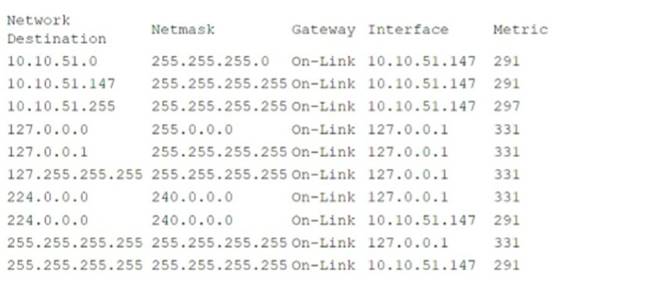
Which of the following commands should the technician use to correct the issue?
- A. route ADD 0.0.0.0 MASK 0.0.0.0 10.10.51.10 metric 35
- B. route CHANGE 10.10.51.0 MASK 255.255.255.255 10.10.52.1 metric 5
- C. route CHANGE 10.10.51.255 MASK 255.0.0.0 On-Link metric 1
- D. route DELETE 127.255.255.255
Answer: A
Explanation:
The route command is used to view and manipulate the IP routing table in Windows operating systems456 The routing table contains information about how to reach different network destinations. The output from the workstation shows that the routing table does not have a default gateway, which is a router that forwards packets to other networks that are not directly connected to the local network. A default gateway is usually specified by a route with a destination of 0.0.0.0 and a netmask of 0.0.0.0, which matches any IP address. To correct the issue, the technician can use the route ADD command to add a default gateway to the routing table. The syntax of the command is:
route ADD <destination> MASK <netmask> <gateway> metric <metric>
The destination and netmask parameters should be 0.0.0.0 to indicate a default route. The gateway parameter should be the IP address of the router that can reach the internet, which is 10.10.51.10 in this case. The metric parameter is an optional value that indicates the cost or preference of the route, which can be used to choose between multiple routes to the same destination. A lower metric means a higher preference. The metric parameter can be any integer between 1 and 9999. In this case, the metric parameter can be 35 or any other value.
Therefore, the correct command is:
route ADD 0.0.0.0 MASK 0.0.0.0 10.10.51.10 metric 35
NEW QUESTION 12
An administrator would like to allow Windows clients from outside me office to access workstations without using third-party software. Which or the following access methods would meet this requirement?
- A. Remote desktop gateway
- B. Spit tunnel
- C. Site-to-site VPN
- D. VNC
Answer: A
Explanation:
To allow Windows clients from outside the office to access workstations without using third-party software, the administrator can use the Remote Desktop Protocol (RDP). RDP is a built-in feature of the Windows operating system that allows users to remotely connect to and control other Windows computers over a network connection.
To use RDP, the administrator will need to enable the Remote Desktop feature on the workstations that need to be accessed, and ensure that the appropriate firewall rules are in place to allow RDP traffic to pass through. The administrator will also need to provide the remote users with the necessary credentials to access the workstations.
Once RDP is set up and configured, the remote users can use the Remote Desktop client on their own computers to connect to the workstations and access them as if they were physically present in the office. This allows the administrator to provide remote access to the workstations without the need for any additional software or third-party tools.
NEW QUESTION 13
Several employees have expressed concerns about the company monitoring their internet activity when they are working from home. The company wants to mitigate this issue and reassure employees that their private internet activity is not being monitored. Which of the following would satisfy company and employee needs?
- A. Split tunnel
- B. Full tunnel
- C. Site-to-site tunnel
- D. Virtual desktop
Answer: A
Explanation:
Split tunnel is a configuration that allows a remote user to access both the local network and the Internet at the same time. In a split tunnel configuration, only traffic destined for the corporate network is sent through the VPN tunnel, while all other traffic is sent directly to the Internet. This allows the remote user to access the Internet without the company's VPN server being able to monitor or intercept their traffic. Using a split tunnel configuration can help the company to mitigate employee concerns about internet activity being monitored and reassure employees that their private internet activity is not being monitored.
NEW QUESTION 14
Which of the following devices would be used to manage a corporate WLAN?
- A. A wireless NAS
- B. A wireless bridge
- C. A wireless router
- D. A wireless controller
Answer: D
Explanation:
A wireless controller is used to manage a corporate WLAN, providing centralized management and configuration of access points. References: CompTIA Network+ Certification Study Guide, Chapter 8: Wireless Networks.
NEW QUESTION 15
After installing a new wireless access point, an engineer tests the device and sees that it is not performing at the rated speeds. Which of the following should the engineer do to troubleshoot the issue? (Select two).
- A. Ensure a bottleneck is not coming from other devices on the network.
- B. Install the latest firmware for the device.
- C. Create a new VLAN for the access point.
- D. Make sure the SSID is not longer than 16 characters.
- E. Configure the AP in autonomous mode.
- F. Install a wireless LAN controller.
Answer: AB
Explanation:
One possible cause of poor wireless performance is a bottleneck in the network, which means that other devices or applications are consuming too much bandwidth or resources and limiting the speed of the wireless access point. To troubleshoot this issue, the engineer should ensure that there is no congestion or interference from other devices on the network, such as wired clients, servers, routers, switches, or other wireless access points. The engineer can use tools such as network analyzers, bandwidth monitors, or ping tests to check the network traffic and latency12.
Another possible cause of poor wireless performance is outdated firmware on the device, which may contain bugs or vulnerabilities that affect the functionality or security of the wireless access point. To troubleshoot this issue, the engineer should install the latest firmware for the device from the manufacturer’s website or support portal. The engineer should follow the instructions carefully and backup the configuration before updating the firmware. The engineer can also check the release notes or changelog of the firmware to see if there are any improvements or fixes related to the wireless performance3 .
The other options are not relevant to troubleshooting poor wireless performance. Creating a new VLAN for the access point may help with network segmentation or security, but it will not improve the speed of the wireless connection. Making sure the SSID is not longer than 16 characters may help with compatibility or readability, but it will not affect the wireless performance. Configuring the AP in autonomous mode may give more control or flexibility to the engineer, but it will not enhance the wireless speed. Installing a wireless LAN controller may help with managing multiple access points or deploying advanced features, but it will not increase the wireless performance.
NEW QUESTION 16
......
Recommend!! Get the Full N10-008 dumps in VCE and PDF From Dumps-files.com, Welcome to Download: https://www.dumps-files.com/files/N10-008/ (New 877 Q&As Version)