The Secret Of VEEAM VMCE_v12 Testing Engine
Refined of VMCE_v12 exam question materials and study guides for VEEAM certification for IT engineers, Real Success Guaranteed with Updated VMCE_v12 pdf dumps vce Materials. 100% PASS Veeam Certified Engineer v12 exam Today!
Online VMCE_v12 free questions and answers of New Version:
NEW QUESTION 1
An infrastructure with 50 VMs has a power outage. After the VMware cluster has booted up again, 10 large VMs are orphaned. However, all VM disk files are still on the datastores. What is the quickest way to bring back those VMs with the least possible data loss?
- A. Remove the existinq VM disk files from the datastore and perform Instant VM Recovery
- B. Perform Instant VM Recovery with quick rollback with automatic Power On VM at the end.
- C. Perform Restore VM Files and only restore the VM configuration files.
- D. Use the "Restore guest files" option to restore the VM configuration files.
Answer: C
Explanation:
In a situation where VMs are orphaned after a power outage but their disk files remain intact on the datastores, the most efficient way to restore these VMs with minimal data loss is C: Perform Restore VM Files and only restore the VM configuration files. This approach involves using Veeam Backup & Replication to restore only the necessary VMX files (for VMware) or equivalent configuration files for other hypervisors, which contain the settings and configuration of the VMs. Since the disk files are still present and intact on the datastores, restoring the configuration files allows the VMs to be re- registered with the hypervisor and brought back online quickly, without the need to transfer or restore the entire VM disk files, thus minimizing downtime and data loss.
NEW QUESTION 2
What is the primary benefit of configuring replica seeding?
- A. Deduplicated WAN traffic
- B. Compressed WAN traffic
- C. Encrypted WAN traffic
- D. Reduced WAN traffic
Answer: D
Explanation:
The primary benefit of configuring replica seeding in Veeam Backup & Replication is reduced WAN traffic. Replica seeding allows for the initial replica to be created using a backup copy that is transported to the DR site, which significantly reduces the amount of data that needs to be transferred over the WAN during the initial replication process.References: Veeam Backup & Replication User Guide, Veeam Replica Seeding Guide
NEW QUESTION 3
An engineer needs to make sure that a backup job includes both the virtual machine's disk files and the Microsoft SQL database transaction logs.
Which backup feature in Veeam Backup and Replication should be used?
- A. Guest file system indexing
- B. Crash consistent mode
- C. App consistent mode
- D. Application-aware processing
Answer: D
Explanation:
To ensure that a backup job includes both the virtual machine's disk files and the Microsoft SQL database transaction logs, Application-aware processing should be used. This feature enables Veeam Backup & Replication to create transactionally consistent backups of VMs running VSS-aware applications like Microsoft SQL Server, ensuring that both the VM disks and the SQL transaction logs are properly backed up.References: Veeam Backup & Replication User Guide, Veeam Application-Aware Processing Guide
NEW QUESTION 4
A daily backup job for seven Hyper-V VMs has been configured at the main site, keeping 14 days' worth of backup files. They want to get a copy of the VM backups to a repository at the disaster recovery site. They want to keep six months' worth of backup files at the disaster recovery site. They also need to be able to restore the VMs to any given day within two months and any given week within the six months. How should a backup copy job be configured to meet these requirements?
- A. Use periodic copy (pruning) mode, keeping 62 days of retention and six monthly GFS restore points.
- B. Use immediate copy (mirroring) mode, keeping 180 days of retention.
- C. Use periodic copy (pruning) mode, keeping 180 days of retention.
- D. Use immediate copy (mirroring) mode, keeping 62 days of retention and 26 weekly GFS restore points.
Answer: A
Explanation:
To meet the specified requirements, configuring a backup copy job in periodic copy (pruning) mode with 62 days of retention and six monthly Grandfather- Father-Son (GFS) restore points is the best approach. This setup allows for daily backups for up to two months and weekly backups for up to six months, aligning with the desired restore capabilities.References: Veeam Backup & Replication User Guide, Veeam GFS Retention Policy Explanation
NEW QUESTION 5
The director of a business needs a folder of files restored from the corporate shared drive. This drive sits on a Windows VM backed up by Veeam Backup & Replication. The director does not want the folder restored to its original location. Where can this folder be restored to using the Veeam Guest OS Restore wizard?
- A. An AWS S3 bucket
- B. An Azure blob
- C. An e-mail as an attachment
- D. A valid UNC path
Answer: D
Explanation:
Using the Veeam Guest OS File Restore wizard, files or folders can be restored to a valid UNC (Universal Naming Convention) path. This means that the director's folder can be restored to any network location that the Windows VM has access to, as long as it's specified in the UNC format, such as \\Server\SharedFolder. This allows for the flexibility of restoring the data to a different location than the original one. References:
✑ Veeam Backup & Replication User Guide: Guest OS File Recovery
✑ Veeam Help Center: Restoring Guest OS Files
NEW QUESTION 6
An engineer has a NAS file share to protect.
What preliminary step must be taken to create a NAS backup job?
- A. Define file exclusions in the job
- B. Register the file server under Storage Infrastructure in the VBR console
- C. Add a Managed Server with the IP address of the NAS Filer
- D. Add a File Share under Inventory and choose NAS Filer
Answer: D
Explanation:
Before creating a NAS backup job, an engineer must add the NAS file share to the Veeam Backup & Replication (VBR) console under the Inventory section. This involves specifying the NAS Filer and the particular file share to be protected. This step
allows Veeam to recognize the file share as a valid source for backup operations.
References:
✑ Veeam Backup & Replication User Guide: NAS Backup
✑ Veeam Help Center: Adding File Shares to Inventory
NEW QUESTION 7
A 3-node Microsoft SQL Always On cluster is running in a VMware environment. The RPOs are:
• 1 day for the cluster nodes
• 15 minutes for the log files
How should the cluster be backed up?
- A. Veeam Backup and Replication - Create a VMware backup job, include the 3 nodes of the cluste
- B. Use Application-Aware Processing to back up the transaction logs every 15 minutes.
- C. Veeam Agent for Windows - Create a managed by server backup job for all 3 node
- D. Use Application-Aware Processing to back up the database once a day.
- E. Veeam Agent for Windows - Create a managed by agent backup policy for all 3 node
- F. Use a log shipping server to back up the transaction logs every 15 minutes.
- G. Veeam Enterprise Plug-in for Microsoft SQL - Install the Plug-in on each node in cluste
- H. Use Microsoft SQL Server Management Studio to create the backups.
Answer: A
Explanation:
For backing up a 3-node Microsoft SQL Always On cluster running in a VMware environment with the specified Recovery Point Objectives (RPOs), the most suitable option is A: Veeam Backup and Replication - Create a VMware backup job, include the 3 nodes of the cluster. Use Application-Aware Processing to back up the transaction logs every 15 minutes. This approach allows for the entire SQL cluster nodes to be backed up as part of a regular VM backup job, which satisfies the 1-day RPO for the cluster nodes. The Application-Aware Processing feature of Veeam Backup & Replication ensures that the SQL databases are in a consistent state during backup. Moreover, this feature allows for the transaction logs to be backed up separately at a more frequent interval, in this case, every 15 minutes, meeting the 15-minute RPO requirement for the log files. This dual approach ensures comprehensive protection for both the SQL cluster nodes and the critical transaction logs, aligning with the specified RPOs.
NEW QUESTION 8
A customer has a local VMware environment that they back up locally and offload all retention to Wasabi’s Cloud. The local backups have become unavailable, and the customer has to recover from Wasabi’s Cloud.
What method would provide the fastest RTO from Wasabi so that users can interact with the recovered system?
- A. Instant Recovery to EC2 VM
- B. Restore Entire VM to local VMware VM
- C. Instant Recovery to Wasabi Cloud VM
- D. Instant Recovery to local VMware VM
Answer: D
Explanation:
In a scenario where a customer needs to recover from Wasabi's Cloud due to local backups becoming unavailable, the method that would provide the fastest Recovery Time Objective (RTO) while allowing users to interact with the recovered system as quickly as possible is D: Instant Recovery to local VMware VM. Veeam's Instant Recovery feature allows for the restoration of a backup directly into the production environment without the need to fully copy the backup data. When recovering from cloud storage like Wasabi, the backup data will be streamed on-demand to the local VMware environment, allowing the VM to start running immediately while the remaining data is transferred in the background. This method minimizes downtime and provides the quickest path to operational recovery, ensuring users can access the recovered system with minimal delay. It's important to note that the effectiveness of this approach depends on the available bandwidth and the size of the data being recovered.
NEW QUESTION 9
An administrator needs to configure a backup job that dynamically adds new VMware hosted SQL servers. How can this be accomplished?
- A. Create a job based on vSphere tags.
- B. Enable application aware processing.
- C. Create a CSV file that is scanned before the backup job starts.
- D. Create a dynamic backup job in Enterprise Manager.
Answer: A
Explanation:
Creating a backup job based on vSphere tags allows for dynamic addition of new VMware hosted SQL servers. When new VMs are tagged appropriately in vSphere, they are automatically included in the backup job, ensuring all relevant SQL servers are backed up without manual intervention.References: Veeam Backup & Replication User Guide, Veeam Dynamic Backup Job Configuration Guide
NEW QUESTION 10
A physical Linux file server needs to be migrated to VMware ESXi. The server has several volumes: /dev/sda (60GB), /dev/sdb (1TB) and /dev/sdc (4TB). What is the quickest option to migrate the server?
- A. Create an empty VM and perform bare metal recovery inside the VM.
- B. Perform Instant VM Recovery.
- C. Perform Instant Disk Recovery for each volume.
- D. Export all disks, create an empty VM and attach the disks.
Answer: B
Explanation:
The quickest option for migrating a physical Linux file server with multiple volumes to VMware ESXi is to perform Instant VM Recovery. This feature allows you to run the server directly from the backup file in a VMware environment, significantly reducing the time and complexity involved in migration.References: Veeam Backup & Replication User Guide, Veeam Instant VM Recovery for Physical Servers
NEW QUESTION 11
In the war against ransomware, a company decided to implement tape backup. The infrastructure contains Hyper-V VMs. What is the correct approach to getting all servers onto tape?
- A. Create media pools, then create file to tape jobs.
- B. Create media sets, then create backup to tape jobs.
- C. Create media sets, then create file to tape jobs.
- D. Create media pools, then create backup to tape jobs.
Answer: D
Explanation:
The correct approach for backing up Hyper-V VMs to tape in a ransomware protection strategy is to create media pools first and then configure backup to tape jobs. This method ensures organized and efficient tape management while securing VM backups on tape media.References: Veeam Backup & Replication User Guide, Veeam Tape Backup Configuration Guide
NEW QUESTION 12
For general data protection regulation (GDPR) compliance, Veeam can add a location tag to which component?
- A. vCenter servers
- B. WAN accelerators
- C. Guest interaction proxies
- D. Cloud gateways
Answer: A
Explanation:
Veeam Backup & Replication offers the capability to assign location tags to different components within the backup infrastructure, including vCenter servers. This feature is particularly useful for GDPR compliance, as it allows administrators to specify the physical location of the data processed and stored within vCenter servers, helping to ensure that data sovereignty and regulatory requirements are met.References:
✑ Veeam Backup & Replication User Guide: Location Tagging for GDPR Compliance
✑ Veeam Help Center: GDPR Compliance and Data Location Controls
NEW QUESTION 13
An engineer sets up a backup job with direct backup to the AWS S3. The retention of the job is set to 31 days and the immutable period is set to 31 days. However, one full backup data is not removed automatically after 60 days.
Which option could be the reason for this?
- A. The backup job is disabled accidentally.
- B. The backup data is encrypted.
- C. It is an active full backup, not synthetic full.
- D. A retention exception is enabled for the restore point.
Answer: D
Explanation:
In Veeam Backup & Replication, an immutable backup means that the backup data cannot be modified or deleted during the specified immutable period. However, even with immutability enabled, once the period expires, the data should be automatically subject to the defined retention policy. If a backup still persists beyond the retention period, a likely explanation is that a retention lock or exception has been applied to that particular restore point, preventing it from being deleted. Other listed reasons wouldn't typically prevent the deletion of the backup file after the immutable period has lapsed.
NEW QUESTION 14
Hourly backup jobs are configured to local repositories. Daily backups must be sent from Site B to the repository on Site A. The connection between the two sites does not allow a direct backup to complete within the backup window. Impact on the source VMs at Site B should be minimized. Which type of job and Veeam components should be used to provide the necessary protection?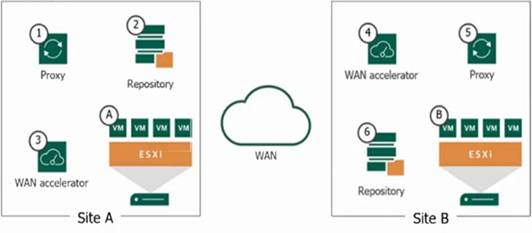
- A. A backup copy job and components 6 ? 4 ? 3 ? 2
- B. A backup job and components 5 ? 4 ? 3 ? 2
- C. A backup job and components 5 ? 2
- D. A backup copy job and components 6?5?4?3?1 ? 2
Answer: A
Explanation:
For the given scenario where daily backups need to be sent from Site B to a repository at Site A and the connection between the two sites is limited, thus impacting the ability to complete direct backups within the backup window, a Backup Copy Job would be appropriate. A Backup Copy Job is a feature in Veeam Backup & Replication that allows you to create several instances of the same backup files across different locations (repositories).
In the image provided, the components involved in the Backup Copy Job from Site B to Site A would be:
✑ 6 (Repository at Site B): This is the source repository where the hourly backup
jobs are stored.
✑ 4 and 3 (WAN Accelerators at both sites): These components optimize data transfer over the WAN.
✑ 2 (Repository at Site A): This is the target repository where the backup copies will be stored.
This setup would minimize impact on the source VMs at Site B since the Backup Copy Job
works with backup data rather than directly with the production VMs, thus reducing the load on those VMs during the process.
NEW QUESTION 15
What describes an RPO?
- A. To confirm at what point a backup should be migrated to Object Storage
- B. To clarify how many restore points need to be recovered at the same time
- C. To determine the maximum length of time a workload or application can be down
- D. To confirm the data loss tolerance of a Business Unit or Organization
Answer: D
Explanation:
Recovery Point Objective (RPO) refers to the maximum acceptable amount of data loss measured in time. It is essentially the age of the files that must be recovered from backup storage for normal operations to resume after a failure or disaster. In other words, it defines the data loss tolerance of a business unit or organization. If an RPO is set to one hour, the system must back up at least every hour to meet the RPO.References:
✑ Veeam Documentation: Recovery Point Objective (RPO)
✑ Veeam Backup & Replication User Guide: RPO and Recovery Time Objective (RTO) Definitions
NEW QUESTION 16
A mid-sized company uses Veeam Backup and Replication to safeguard their business- critical data from ransomware attacks. The company needs to validate backups and increase security, while improving DevOps efficiency.
How can a SureBackup Job be utilized to address the company's specific needs?
- A. Helps improve the data deduplication and compression ratios
- B. Validates backup data and ensures backups are ransom ware-free
- C. Creates a secure, isolated environment to test new applications
- D. Improves recovery speed reducing RTO
Answer: C
Explanation:
A SureBackup Job in Veeam Backup and Replication can be utilized to create a secure, isolated environment to test new applications. This feature allows companies to validate backups and run their VMs in an isolated environment, providing an opportunity to test applications, patches, or updates without impacting the production environment.References: Veeam Backup & Replication Documentation, Veeam SureBackup Guide
NEW QUESTION 17
......
100% Valid and Newest Version VMCE_v12 Questions & Answers shared by 2passeasy, Get Full Dumps HERE: https://www.2passeasy.com/dumps/VMCE_v12/ (New 109 Q&As)