Microsoft 70-640 Free Samples 2021
Master the 70-640 TS: Windows Server 2008 Active Directory. Configuring content and be ready for exam day success quickly with this Examcollection 70-640 testing engine. We guarantee it!We make it a reality and give you real 70-640 questions in our Microsoft 70-640 braindumps.Latest 100% VALID Microsoft 70-640 Exam Questions Dumps at below page. You can use our Microsoft 70-640 braindumps and pass your exam.
NEW QUESTION 1
You have an Active Directory snapshot.
You need to view the contents of the organizational units (OUs) in the snapshot.
Which tools should you run?
- A. explorer.exe, netdom.exe, and dsa.msc
- B. ntdsutil.exe, dsamain.exe, and dsa.msc
- C. wbadmin.msc, dsamain.exe, and netdom.exe
- D. wbadmin.msc, ntdsutil.exe, and explorer.exe
Answer: B
NEW QUESTION 2
Your network contains an Active Directory domain named contoso.com.
You create two global groups named Group1 and Group2. The group membership of each group is shown in the following table. 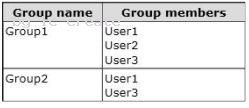
You create the Password Settings objects (PSOs) shown in the following table. 
In the table below, identify which PSOs will apply to User1 and User2. Make only one selection in each column. 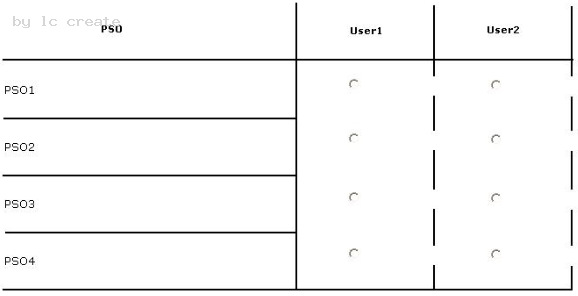
- A. Mastered
- B. Not Mastered
Answer: A
Explanation:
NEW QUESTION 3
You are an administrator at ABC.com. Company has a network of 5 member servers acting as file servers. It has an Active Directory domain.
You have installed a software application on the servers. As soon as the application is installed, one of the member servers shuts down itself. To trace and rectify the problem, you create a Group Policy Object (GPO).
You need to change the domain security settings to trace the shutdowns and identify the cause of it.
What should you do to perform this task?
- A. Link the GPO to the domain and enable System Events option
- B. Link the GPO to the domain and enable Audit Object Access option
- C. Link the GPO to the Domain Controllers and enable Audit Object Access option
- D. Link the GPO to the Domain Controllers and enable Audit Process tracking option
- E. Perform all of the above actions
Answer: A
Explanation:
http://msdn.microsoft.com/en-us/library/ms813610.aspx
Audit system events Computer ConfigurationWindows SettingsSecurity SettingsLocal PoliciesAudit Policy
Description Determines whether to audit when a user restarts or shuts down the computer;
or an event has occurred that affects either the system security or the security log.
By default, this value is set to No auditing in the Default Domain Controller Group Policy
object (GPO) and in the local policies of workstations and servers.
If you define this policy setting, you can specify whether to audit successes, audit failures,
or not to audit the event type at all. Success audits generate an audit entry when a system
event is successfully executed. Failure audits generate an audit entry when a system event
is unsuccessfully attempted. You can select No auditing by defining the policy setting and
unchecking Success and Failure.
NEW QUESTION 4
You create a user account template for the marketing department.
When you copy the user account template, you discover that the Web page attribute is not copied.
You need to preserve the Web page attribute when you copy the user account template.
What should you do?
- A. From Active Directory Administrative Center, modify the value of the wWWHomePage attribute for the user account templat
- B. From the Active Directory Schema snap-in, modify the properties of the user clas
- C. From Active Directory Users and Computers, modify the value of the wWWHomePage attribute for the user account templat
- D. From ADSI Edit, modify the properties of the wWWHomePage attribut
Answer: B
Explanation:
http://technet.microsoft.com/en-us/library/cc771231.aspx
You can modify which default attributes are carried over to a newly copied user or specify additional attributes that will be copied to the new user. To do this, open the Active Directory Schema snap-in, view the desired attribute properties, and select (or clear) the Attribute is copied when duplicating user check box. You can modify or add only the attributes that are instances of the user class.
NEW QUESTION 5
Your network contains an Active Directory domain named contoso.com. The domain contains an enterprise certification authority (CA).
You need to deploy certificates based on Version 1 templates to all of the computers in the domain. The solution must minimize administrative effort.
You create a Group Policy object (GPO) named GPO1 and link the GPO to the domain.
What should you do next?
- A. In GPO1, configure Certificate Services Client - Certificate Enrollment Polic
- B. In GPO1, configure Automatic Certificate Request Setting
- C. In GPO1, configure Software installatio
- D. Duplicate the template
- E. In GPO1, configure Software installatio
Answer: B
Explanation:
Automatic certificate request settings Certificate enrollment is the process of requesting, receiving, and installing a certificate. By using automatic certificate settings in public key policies, you can have computers that are associated with a Group Policy object (GPO) automatically enroll for certificates. This can save you the step of explicitly enrolling for computer-related certificates for each computer. After you establish an automatic certificate request, the actual certificate requests occur the next time the computers associated with the GPO log on to the network.
NEW QUESTION 6
You need to ensure that domain controllers only replicate between domain controllers in adjacent sites.What should you configure from Active Directory Sites and Services?
- A. From the IP properties, select Ignore all schedule
- B. From the IP properties, select Disable site link bridgin
- C. From the NTDS Settings object, manually configure the Active Directory Domain Services connection object
- D. From the properties of the NTDS Site Settings object, configure the Inter-Site Topology Generator for each sit
Answer: B
Explanation:
http://www.omnisecu.com/windows-2003/active-directory/what-is-site-link-bridge.htm What is Site Link Bridge and How to create Site Link Bridge A site link bridge connects two or more site links. A site link bridge enables transitivity between site links. Each site link in a bridge must have a site in common with another site link in the bridge. By default, all site links are transitive and it is recommended to keep transitivity enabled by not changing the default value of "Bridge all site links" (enabled by default). 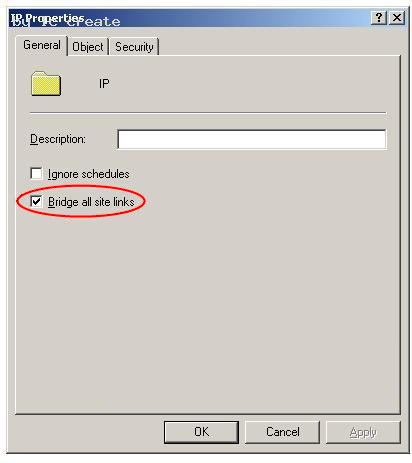
C:Documents and Settingsusernwz1Desktop1.PNG
We may need to disable "Bridge all site links" and create a site link bridge design if
. When the IP network is not fully routed.
. When we need to control the replication flow in Active Directory.
NEW QUESTION 7
Your network contains an Active Directory domain named contoso.com. The domain contains a domain controller named DC1. DC1 has the DNS Server server role installed and hosts an Active Directory-integrated zone for contoso.com. The no-refresh interval and the refresh interval are both set to three days. The Advanced DNS settings of DC1 are shown in the Advanced DNS Settings exhibit. (Click the Exhibit button.)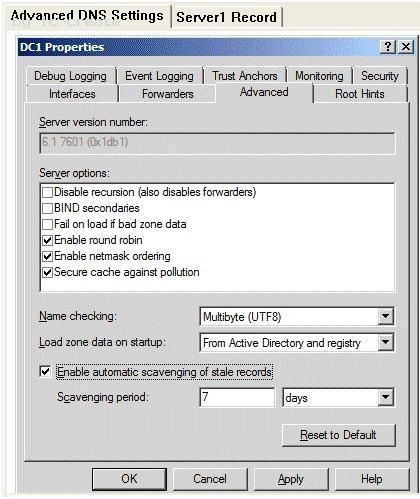
You open the properties of a static record named Server1 as shown in the Server1 Record exhibit.(Click the Exhibit button.) 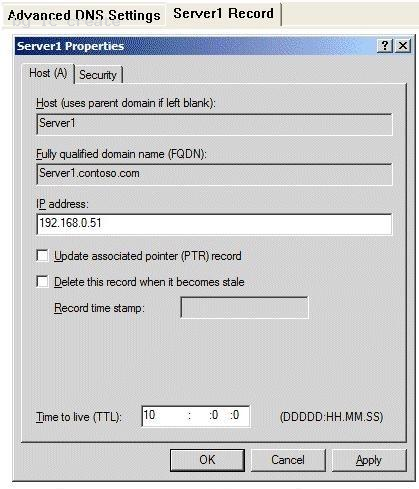
You discover that the scavenging process ran today, but the record for Server1 was not
deleted.
You run dnscmd.exe and specify the age all records parameter.
You need to identify when the record for Server1 will be deleted from the zone.
In how many days will the record be deleted?
- A. 13
- B. 10
- C. 23
- D. 7
Answer: D
Explanation:
The blank Record time stamp field indicates a static record. That's the reason it wasn't deleted. The timestamp has been set using dnscmd /ageallrecords. The Time to live setting means that the server will hold a cached record for 10 days, so it has nothing to do with this question. The record will become stale in six days (no-refresh interval + refresh interval, that's 3 + 3 days), so now that the timestamp has been set it will be deleted when the next scavenging operation occurs, in seven days.
Explanation 1: http://technet.microsoft.com/en-us/library/cc772069.aspx dnscmd /ageallrecords Sets the current time on all time stamps in a zone or node. Record scavenging does not occur unless the records are time stamped. Name server (NS) resource records, start of authority (SOA) resource records, and Windows Internet Name Service (WINS) resource records are not included in the scavenging process, and they are not time stamped even when the ageallrecords command runs.
Explanation 2: http://www.windowsitpro.com/article/dns/scavenging-stale-dns-records
When a record is older than the sum of the no-refresh interval and the refresh interval, the scavenging feature considers the record stale and deletes it. So, when you set No-refresh interval to 3 days and Refresh interval to 5 days, scavenging will delete records that are more than 8 days old.
NEW QUESTION 8
You have a domain controller that runs Windows Server 2008 R2. The Windows Server Backup feature is installed on the domain controller.
You need to perform a non-authoritative restore of the domain controller by using an existing backup file.
What should you do?
- A. Restart the domain controller in Directory Services Restore Mod
- B. Use the WBADMIN command to perform a critical volume restor
- C. Restart the domain controller in Directory Services Restore Mod
- D. Use the Windows Server Backup snap-in to perform a critical volume restor
- E. Restart the domain controller in safe mod
- F. Use the Windows Server Backup snap-in to perform a critical volume restor
- G. Restart the domain controller in safe mod
- H. Use the WBADMIN command to perform a critical volume restor
Answer: A
Explanation:
Almost identical to B26 http://technet.microsoft.com/en-us/library/cc816627%28v=ws.10%29.aspx Performing Nonauthoritative Restore of Active Directory Domain Services A nonauthoritative restore is the method for restoring Active Directory Domain Services (AD DS) from a system state, critical-volumes, or full server backup. A nonauthoritative restore returns the domain controller to its state at the time of backup and then allows normal replication to overwrite that state with any changes that occurred after the backup was taken. After you restore AD DS from backup, the domain controller queries its replication partners. Replication partners use the standard replication protocols to update AD DS and associated information, including the SYSVOL shared folder, on the restored domain controller. You can use a nonauthoritative restore to restore the directory service on a domain controller without reintroducing or changing objects that have been modified since the backup. The most common use of a nonauthoritative restore is to reinstate a domain controller, often after catastrophic or debilitating hardware failures. In the case of data corruption, do not use nonauthoritative restore unless you have confirmed that the problem is with AD DS. Nonauthoritative Restore Requirements You can perform a nonauthoritative restore from backup on a Windows Server 2008 system that is a standalone server, member server, or domain controller. On domain controllers that are running Windows Server 2008, you can stop and restart AD DS as a service. Therefore, in Windows Server 2008, performing offline defragmentation and other database management tasks does not require restarting the domain controller in Directory Services Restore Mode (DSRM). However, you cannot perform a nonauthoritative restore after simply stopping the AD DS service in regular startup mode. You must be able to start the domain controller in Directory Services Restore Mode (DSRM). If the domain controller cannot be started in DSRM, you must first reinstall the operating system. To perform a nonauthoritative restore, you need one of the following types of backup for your backup source: System state backup: Use this type of backup to restore AD DS. If you have reinstalled the operating system, you must use a critical-volumes or full server backup. If you are restoring a system state backup, use the wbadmin start systemstaterecovery command. Critical-volumes backup: A critical-volumes backup includes all data on all volumes that contain operating system and registry files, boot files, SYSVOL files, or Active Directory files. Use this type of backup if you want to restore more than the system state. To restore a critical-volumes backup, use the wbadmin start recovery command. Full server backup: Use this type of backup only if you cannot start the server or you do not have a system state or critical-volumes backup. A full server backup is generally larger than a critical-volumes backup. Restoring a full server backup not only rolls back data in AD DS to the time of backup, but it also rolls back all data in all other volumes. Rolling back this additional data is not necessary to achieve nonauthoritative restore of AD DS.
NEW QUESTION 9
You have a domain controller named DC1 that runs Windows Server 2008 R2. DC1 is
configured as a DNS Server for contoso.com.
You install the DNS Server role on a member server named Server1 and then you create a
standard secondary zone for contoso.com.
You configure DC1 as the master server for the zone.
You need to ensure that Server1 receives zone updates from DC1.
What should you do?
- A. On DC1, modify the permissions of contoso.com zon
- B. On Server1, add a conditional forwarde
- C. On DC1, modify the zone transfer settings for the contoso.com zon
- D. Add the Server1 computer account to the DNSUpdateProxy grou
Answer: C
Explanation:
http://technet.microsoft.com/en-us/library/cc771652.aspx
Modify Zone Transfer Settings You can use the following procedure to control whether a zone will be transferred to other servers and which servers can receive the zone transfer.
To modify zone transfer settings using the Windows interface
1. Open DNS Manager.
2. Right-click a DNS zone, and then click Properties.
3. On the Zone Transfers tab, do one of the following:
To disable zone transfers, clear the Allow zone transfers check box.
To allow zone transfers, select the Allow zone transfers check box.
4. If you allowed zone transfers, do one of the following:
To allow zone transfers to any server, click To any server.
To allow zone transfers only to the DNS servers that are listed on the Name Servers tab,
click Only to servers listed on the Name Servers tab.
To allow zone transfers only to specific DNS servers, click Only to the following servers,
and then add the IP address of one or more DNS servers.
NEW QUESTION 10
Your company uses an application that stores data in an Active Directory Lightweight Directory Services (AD LDS) instance named Instance1.
You attempt to create a snapshot of Instance1 as shown in the exhibit. (Click the Exhibit button.)
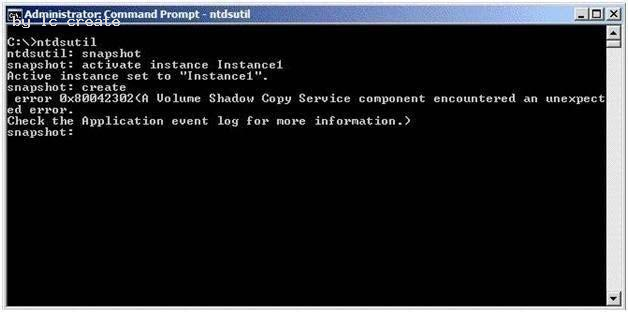
You need to ensure that you can take a snapshot of Instance1.
What should you do?
- A. At the command prompt, run net start VS
- B. At the command prompt, run net start Instance1.
- C. Set the Startup Type for the Instance1 service to Disable
- D. Set the Startup Type for the Volume Shadow Copy Service (VSS) to Manua
Answer: A
Explanation:
Hard to find Explanations on this, but the solution can be found by eliminating the rest.
Instance1 is running, otherwise you'd get a different message at the snaphot: create step.
("AD service
must be running in order to perform this operation", on my virtual server.)
Disabling Instance1 makes no sense because you need it, nor is setting the Startup Type
for the Volume
Shadow Copy Service (VSS) to Manual.
NEW QUESTION 11
You deploy a new Active Directory Federation Services (AD FS) federation server.
You request new certificates for the AD FS federation server.
You need to ensure that the AD FS federation server can use the new certificates.
To which certificate store should you import the certificates?
- A. Computer
- B. IIS Admin Service service account
- C. Local Administrator
- D. World Wide Web Publishing Service service account
Answer: A
Explanation:
http://technet.microsoft.com/en-us/library/dd378922%28v=ws.10%29.aspx#BKMK_13 Step 2: Installing AD FS Role Services and Configuring Certificates To import the server authentication certificate for adfsresource to adfsweb
1. Click Start, click Run, type mmc, and then click OK.
2. Click File, and then click Add/Remove Snap-in.
3. Select Certificates, click Add, click Computer account, and then click Next.
4. Click Local computer: (the computer this console is running on), click Finish, and then click OK.
5. In the console tree, double-click the Certificates (Local Computer) icon, double-click the Trusted Root Certification Authorities folder, right-click Certificates, point to All Tasks, and then click Import.
6. On the Welcome to the Certificate Import Wizard page, click Next.
7. On the File to Import page, type \adfsresourced$adfsresource.pfx, and then click Next.
8. On the Password page, type the password for the adfsresource.pfx file, and then click Next.
9. On the Certificate Store page, click Place all certificates in the following store, and then click Next.
10. On the Completing the Certificate Import Wizard page, verify that the information you provided is accurate, and then click Finish.
NEW QUESTION 12
You are one of two network administrators for your organization.
Your IT partner does most of the work in Active Directory.
While working in Active Directory, your partner accidently deleted a user from the Sales OU.
You recover the user from tape backup but you want to help prevent this from happening again in the future.
What can you do?
- A. Enable the Active Directory Recycle Bi
- B. Use ADSI Edit to restore the use
- C. Take away all rights from the other administrato
- D. Use the Directory Services Restore Mode Lockout comman
Answer: A
Explanation:
http://technet.microsoft.com/en-us/library/dd392261%28v=ws.10%29.aspx Active Directory Recycle Bin Step-by-Step Guide Active Directory Recycle Bin helps minimize directory service downtime by enhancing your ability to preserve and restore accidentally deleted Active Directory objects without restoring Active Directory data from backups, restarting Active Directory Domain Services (AD DS), or rebooting domain controllers. When you enable Active Directory Recycle Bin, all link-valued and non-link-valued attributes of the deleted Active Directory objects are preserved and the objects are restored in their entirety to the same consistent logical state that they were in immediately before deletion. For example, restored user accounts automatically regain all group memberships and corresponding access rights that they had immediately before deletion, within and across domains.
Active Directory Recycle Bin is functional for both AD DS and Active Directory Lightweight Directory Services (AD LDS) environments.
Important By default, Active Directory Recycle Bin in Windows Server 2008 R2 is disabled. To enable it, you must first raise the forest functional level of your AD DS or AD LDS environment to Windows Server 2008 R2, which in turn requires all forest domain controllers or all servers that host instances of AD LDS configuration sets to be running Windows Server 2008 R2. After you set the forest functional level of your environment to Windows Server 2008 R2, you can use the instructions in this guide to enable Active Directory Recycle Bin. In this release of Windows Server 2008 R2, the process of enabling Active Directory Recycle Bin is irreversible. After you enable Active Directory Recycle Bin in your environment, you cannot disable it.
NEW QUESTION 13
Your network contains two Active Directory forests named contoso.com and nwtraders.com. A two-way forest trust exists between contoso.com and nwtraders.com. The forest trust is configured to use selective authentication.
Contoso.com contains a server named Server1. Server1 contains a shared folder named Marketing.
Nwtraders.com contains a global group named G_Marketing. The Change share permission and the Modify NTFS permission for the Marketing folder are assigned to the G_Marketing group. Members of G_Marketing report that they cannot access the Marketing folder.
You need to ensure that the G_Marketing members can access the folder from the network.
What should you do?
- A. From Windows Explorer, modify the NTFS permissions of the folde
- B. From Windows Explorer, modify the share permissions of the folde
- C. From Active Directory Users and Computers, modify the computer object for Server1.
- D. From Active Directory Users and Computers, modify the group object for G_Marketin
Answer: C
Explanation:
MS Press - Self-Paced Training Kit (Exam 70-640) (2nd Edition, July 2012) page 643-644
After you have selected Selective Authentication for the trust, no trusted users will be able to access resources in the trusting domain, even if those users have been given permissions. The users must also be assigned the Allowed To Authenticate permission on the computer object in the domain.
To assign this permission:
1. Open the Active Directory Users And Computers snap-in and make sure that Advanced Features is selected on the View menu.
2. Open the properties of the computer to which trusted users should be allowed to authenticate—that is, the computer that trusted users will log on to or that contains resources to which trusted users have been given permissions.
3. On the Security tab, add the trusted users or a group that contains them and select the Allow check box for the Allowed To Authenticate permission.
NEW QUESTION 14
Your network contains an Active Directory forest named contoso.com. The forest contains a single domain. The domain contains 50 domain controllers that run Windows Server 2008
R2.
The domain contains a group named Computer_Location.
You plan to create 1,000 computer accounts in the domain in several organizational units (OUs).
You need to ensure that the members of the Computer_Location group can modify the description of each computer account as soon as the account is created.
The solution must use permissions that are applied explicitly to the new computer accounts.
What should you do?
- A. Run the dsadd.exe command
- B. Run the nltest.exe comman
- C. Run the Set-AdDomain cmdle
- D. Run the dsmove.exe comman
- E. Run the dcpromo.exe comman
- F. Run the Move-AdDirectoryServer cmdle
- G. Use the Active Directory Schema snap-i
- H. Use the Active Directory Users and Computers consol
Answer: G
NEW QUESTION 15
Your network contains an Active Directory domain named adatum.com. The functional level of the domain is Windows Server 2003. All domain controllers run Windows Server 2008 R2.
You mount an Active Directory snapshot.
You need to ensure that you can connect to the snapshot by using LDAP.
What should you do?
- A. Run the Get-ADDomain cmdle
- B. Run the dsget.exe comman
- C. Run the ntdsutil.exe comman
- D. Run the ocsetup.exe comman
- E. Run the dsamain.exe comman
- F. Run the eventcreate.exe command,
- G. Create a Data Collector Set (DCS).
- H. Create custom views from Event Viewe
- I. Configure subscriptions from Event Viewe
- J. Import the Active Directory module for Windows PowerShel
Answer: E
Explanation:
http://technet.microsoft.com/en-us/library/cc753609.aspx
The Active Directory database mounting tool (Dsamain.exe) can improve recovery processes for your organization by providing a means to compare data as it exists in snapshots that are taken at different times so that you can better decide which data to restore after data loss. This eliminates the need to restore multiple backups to compare the Active Directory data that they contain.
Requirements for using the Active Directory database mounting tool
You do not need any additional software to use the Active Directory database mounting tool. All the tools that are required to use this feature are built into Windows Server 2008 and are available if you have the AD DS or the AD LDS server role installed. These tools include the following: (...)
Dsamain.exe, which you can use to expose the snapshot data as an LDAP server
Existing LDAP tools, such as Ldp.exe and Active Directory Users and Computers
NEW QUESTION 16
Your network contains an Active Directory domain named contoso.com. The network contains client computers that run either Windows Vista or Windows 7. Active Directory Rights Management Services (AD RMS) is deployed on the network.
You create a new AD RMS template that is distributed by using the AD RMS pipeline. The template is updated every month.
You need to ensure that all the computers can use the most up-to-date version of the AD RMS template.
You want to achieve this goal by using the minimum amount of administrative effort.
What should you do?
- A. Upgrade all of the Windows Vista computers to Windows 7.
- B. Upgrade all of the Windows Vista computers to Windows Vista Service Pack 2 (SP2).
- C. Assign the Microsoft Windows Rights Management Services (RMS) Client Service Pack 2 (SP2) to all users by using a Software Installation extension of Group Polic
- D. Assign the Microsoft Windows Rights Management Services (RMS) Client Service Pack 2 (SP2) to all computers by using a Software Installation extension of Group Polic
Answer: B
NEW QUESTION 17
You have an enterprise subordinate certification authority (CA).
You have a custom certificate template that has a key length of 1,024 bits. The template is enabled for autoenrollment.
You increase the template key length to 2,048 bits.
You need to ensure that all current certificate holders automatically enroll for a certificate that uses the new template.
Which console should you use?
- A. Group Policy Management MMC Snap-In
- B. Certificates MMC Snap-In on the Certificate Authority
- C. Certificate Templates MMC Snap-In
- D. Certification Authority MMC Snap-In
Answer: C
Explanation:
http://technet.microsoft.com/en-us/library/cc771246.aspx
Re-Enroll All Certificate Holders
This procedure is used when a critical change is made to the certificate template and you want all subjects that hold a certificate that is based on this template to re-enroll as quickly as possible. The next time the subject verifies the version of the certificate against the version of the template on the certification authority (CA), the subject will re-enroll.
Membership in Domain Admins or Enterprise Admins, or equivalent, is the minimum required to complete this procedure. For more information, see Implement Role-Based Administration.
To re-enroll all certificate holders
1. Open the Certificate Templates snap-in.
2. Right-click the template that you want to use, and then click Reenroll All Certificate Holders.
NEW QUESTION 18
HOTSPOT
You have a standard primary zone named contoso.com.
You need to configure how often the zone will be transferred to servers that host a
secondary copy of the zone.
Which tab should you use?
To answer, select the appropriate tab in the answer area. 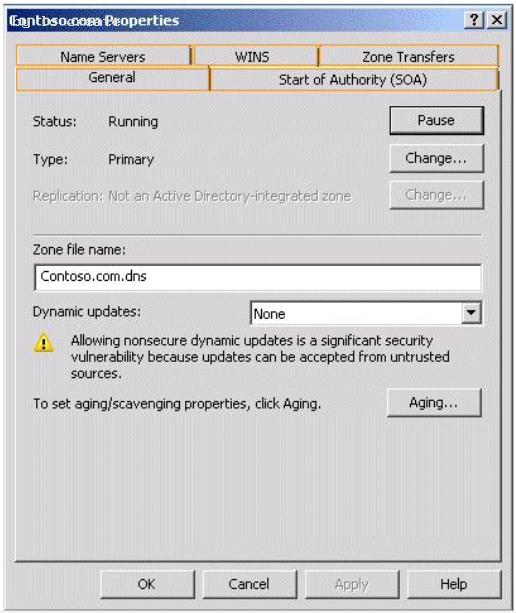
- A. Mastered
- B. Not Mastered
Answer: A
Explanation:
NEW QUESTION 19
You create a new Active Directory domain. The functional level of the domain is Windows Server 2008 R2. The domain contains five domain controllers.
You need to monitor the replication of the group policy template files.
Which tool should you use?
- A. Dfsrdiag
- B. Fsutil
- C. Ntdsutil
- D. Ntfrsutl
Answer: A
Explanation:
With domain functional level 2008 you have available dfs-r sysvol replication. So with
DFL2008 you can use the DFSRDIAG tool. It is not available with domain functional level
2003.
With domain functional level 2003 you can only use Ntfrsutl.
NEW QUESTION 20
Your company has an Active Directory domain that has an organizational unit named Sales. The Sales organizational unit contains two global security groups named sales managers and sales executives.
You need to apply desktop restrictions to the sales executives group.
You must not apply these desktop restrictions to the sales managers group.
You create a GPO named DesktopLockdown and link it to the Sales organizational unit.
What should you do next?
- A. Configure the Deny Apply Group Policy permission for Authenticated Users on the DesktopLockdown GP
- B. Configure the Deny Apply Group Policy permission for the sales executives on the DesktopLockdown GP
- C. Configure the Allow Apply Group Policy permission for Authenticated Users on the DesktopLockdown GP
- D. Configure the Deny Apply Group Policy permission for the sales managers on the DesktopLockdown GP
Answer: D
Explanation:
http://support.microsoft.com/kb/816100 How to prevent domain Group Policies from applying to certain user or computer accounts Typically, if you want Group Policy to apply only to specific accounts (either user accounts, computer accounts, or both), you can put the accounts in an organizational unit, and then apply Group Policy at that organizational unit level. However, there may be situations where you want to apply Group Policy to a whole domain, although you may not want those policy settings to also apply to administrator accounts or to other specific users or groups. http://www.grouppolicy.biz/2010/05/how-to-exclude-individual-users-or-computers-from-a-group-policy-object/ Best Practice: How to exclude individual users or computers from a Group Policy Object One of the common question I see on the forums from time to time is how to exclude a user and/or a computer from having a Group Policy Object (GPO) applied. This is a relatively straight forward process however I should stress this should be used sparingly and should always be done via group membership to avoid the administrative overhead of having to constantly update the security filtering on the GPO. Step 1. Open the Group Policy Object that you want to apply an exception and then click on the “Delegation” tab and then click on the “Advanced” button. 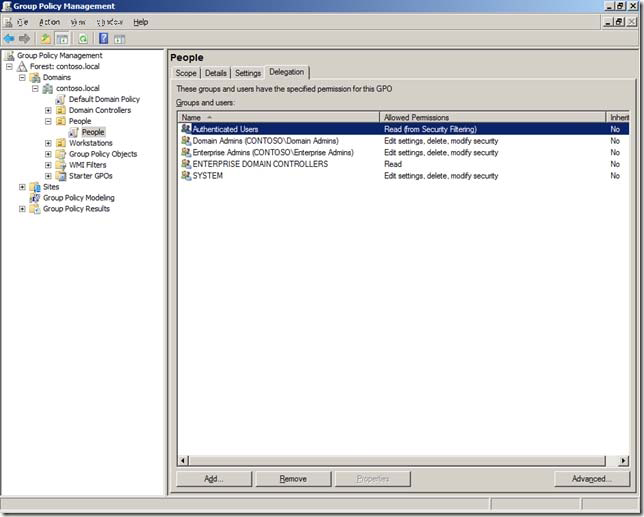
C:Documents and Settingsusernwz1Desktop1.PNG
Step 2. Click on the “Add” button and select the group (recommended) that you want to exclude from having this policy applied. 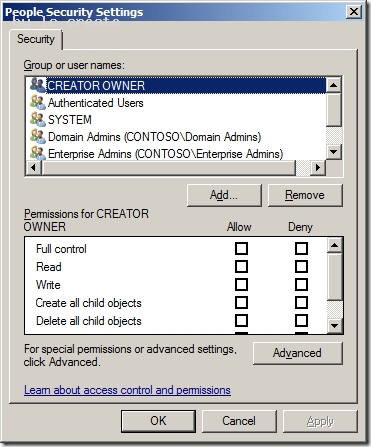
C:Documents and Settingsusernwz1Desktop1.PNG
Step 3. In this example I am excluding the “Users GPO Exceptions” group for this policy. Select this group in the “Group or user names” list and then scroll down the permission and tick the “Deny” option against the “Apply Group Policy” permission. 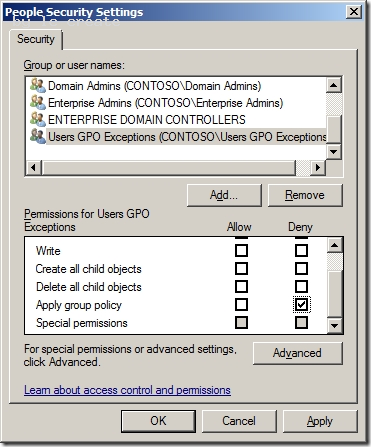
C:Documents and Settingsusernwz1Desktop1.PNG
Now any members of this “User GPO Exceptions” security group will not have this Group Policy Object applied. Having a security group to control this exception makes it much easier to control as someone only needs to modify the group membership of the group to makes changes to who (or what) get the policy applied. This makes the delegation of this task to level 1 or level 2 support much more practical as you don’t need to grant them permission to the Group Policy Objects.
NEW QUESTION 21
Your company has a main office and a branch office. You deploy a read-only domain controller (RODC) that runs Microsoft Windows Server 2008 to the branch office.
You need to ensure that users at the branch office are able to log on to the domain by using the RODC.
What should you do?
- A. Add another RODC to the branch offic
- B. Configure a new bridgehead server in the main offic
- C. Decrease the replication interval for all connection objects by using the Active Directory Sites and Services consol
- D. Configure the Password Replication Policy on the ROD
Answer: D
Explanation:
Answer: Configure the Password Replication Policy on the RODC.
http://technet.microsoft.com/en-us/library/cc754956%28v=ws.10%29.aspx RODC Frequently Asked Questions What new attributes support the RODC Password Replication Policy? Password Replication Policy is the mechanism for determining whether a user or computer's credentials are allowed to replicate from a writable domain controller to an RODC. The Password Replication Policy is always set on a writable domain controller running Windows Server 2008. What operations fail if the WAN is offline, but the RODC is online in the branch office? If the RODC cannot connect to a writable domain controller running Windows Server 2008 in the hub, the following branch office operations fail: Password changes Attempts to join a computer to a domain Computer rename Authentication attempts for accounts whose credentials are not cached on the RODC Group Policy updates that an administrator might attempt by running the gpupdate /force command What operations succeed if the WAN is offline, but the RODC is online in the branch office? If the RODC cannot connect to a writable domain controller running Windows Server 2008 in the hub, the following branch office operations succeed: Authentication and logon attempts, if the credentials for the resource and the requester are already cached, Local RODC server administration performed by a delegated RODC server administrator.
NEW QUESTION 22
A user attempts to join a computer to the domain, but the attempt fails.
You need to ensure that the user can join fifty computer to the domain. You must ensure that the user is denied any additional rights beyond those required to complete the task.
What should you do?
- A. Prestage each computer account in the Active Directory domai
- B. Deploy a Group Policy Object (GPO) that modifies the user rights setting
- C. Add the user to the Domain Administrators group for one da
- D. Deploy a Group Policy object (GPO) that modifies the Restricted Groups setting
Answer: A
NEW QUESTION 23
Your network contains an Active Directory domain. The domain contains two Active Directory sites named Site1 and Site2. Site1 contains two domain controllers named DC1 and DC2. Site2 contains two domain controller named DC3 and DC4. The functional level of the domain is Windows Server 2008 R2. The functional level of the forest is Windows Server 2003. Active Directory replication between Site1 and Site2 occurs from 20:00 to
01:00 every day.
At 07:00, an administrator deletes a user account while he is logged on to DC1.
You need to restore the deleted user account. You want to achieve this goal by using the minimum amount of administrative effort.
What should you do?
- A. On DC1, run the Restore-ADObject cmdle
- B. On DC3, run the Restore-ADObject cmdle
- C. On DC1, stop Active Directory Domain Services, restore the System State, and then start Active Directory Domain Service
- D. On DC3, stop Active Directory Domain Services, perform an authoritative restore, and then start Active Directory Domain Service
Answer: D
Explanation:
We cannot use Restore-ADObject, because Restore-ADObject is a part of the Recycle Bin feature, and you can only use Recycle Bin when the forest functional level is set to Windows Server 2008 R2. In the question text it says "The functional level of the forest is Windows Server 2003." Seehttp://technet.microsoft.com/nl-nl/library/dd379481.aspx Performing an authoritative restore on DC3 updates the Update Sequence Number (USN) on that DC, which causes it to replicate the restored user account to other DC's. Explanation 1: MS Press - Self-Paced Training Kit (Exam 70-640) (2nd Edition, July 2012) page 692 An authoritative restore restores data that was lost and updates the Update Sequence Number (USN) for the data to make it authoritative and ensure that it is replicated to all other servers. Explanation 2: http://technet.microsoft.com/en-us/library/cc755296.aspx Authoritative restore of AD DS has the following requirements: You must stop the Active Directory Domain Services service before you run the ntdsutil authoritative restore command and restart the service after the command is complete.
NEW QUESTION 24
Your company has an Active Directory forest. The company has three locations. Each location has an organizational unit and a child organizational unit named Sales.
The Sales organizational unit contains all users and computers of the sales department.
The company plans to deploy a Microsoft Office 2007 application on all computers within the three Sales organizational units.
You need to ensure that the Office 2007 application is installed only on the computers in the Sales organizational units.
What should you do?
- A. Create a Group Policy Object (GPO) named SalesAPP GP
- B. Configure the GPO to assign the application to the computer accoun
- C. Link the SalesAPP GPO to the domai
- D. Create a Group Policy Object (GPO) named SalesAPP GP
- E. Configure the GPO to assign the application to the user accoun
- F. Link the SalesAPP GPO to the Sales organizational unit in each locatio
- G. Create a Group Policy Object (GPO) named SalesAPP GP
- H. Configure the GPO to assign the application to the computer accoun
- I. Link the SalesAPP GPO to the Sales organizational unit in each locatio
- J. Create a Group Policy Object (GPO) named SalesAPP GP
- K. Configure the GPO to publish the application to the user accoun
- L. Link the SalesAPP GPO to the Sales organizational unit in each locatio
Answer: C
NEW QUESTION 25
Your company network has an Active Directory forest that has one parent domain and one child domain. The child domain has two domain controllers that run Windows Server 2008. All user accounts from the child domain are migrated to the parent domain. The child domain is scheduled to be decommissioned.
You need to remove the child domain from the Active Directory forest.
What are two possible ways to achieve this goal? (Each correct answer presents a complete solution. Choose two.)
- A. Run the Computer Management console to stop the Domain Controller service on both domain controllers in the child domai
- B. Delete the computer accounts for each domain controller in the child domai
- C. Remove the trust relationship between the parent domain and the child domai
- D. Use Server Manager on both domain controllers in the child domain to uninstall the Active Directory domain services rol
- E. Run the Dcpromo tool that has individual answer files on each domain controller in the child domai
Answer: CD
Explanation:
http://technet.microsoft.com/en-us/library/cc755937%28v=ws.10%29.aspx Decommissioning a Domain Controller To complete this task, perform the following procedures:
1. View the current operations master role holders
2. Transfer the schema master
3. Transfer the domain naming master
4. Transfer the domain-level operations master roles
5. Determine whether a domain controller is a global catalog server
6. Verify DNS registration and functionality
7. Verify communication with other domain controllers
8. Verify the availability of the operations masters
9. If the domain controller hosts encrypted documents, perform the following procedure before you remove Active Directory to ensure that the encrypted files can be recovered after Active Directory is removed: Export a certificate with the private key 10.Uninstall Active Directory 11.If the domain controller hosts encrypted documents and you backed up the certificate and private key before you remove Active Directory, perform the following procedure to re-import the certificate to the server: Import a certificate
12. Determine whether a Server object has child objects
13. Delete a Server object from a site
http://technet.microsoft.com/en-us/library/cc737258%28v=ws.10%29.aspx Uninstall Active Directory To uninstall Active Directory
1. Click Start, click Run, type dcpromo and then click OK.
NEW QUESTION 26
Your network contains an Active Directory domain named adatum.com. All servers run
Windows Server 2008 R2 Enterprise. All client computers run Windows 7 Professional.
The network contains an enterprise certification authority (CA).
You need to approve a pending certificate request.
Which snap-in should you use?
- A. Active Directory Administrative Center
- B. Authorization Manager
- C. Certificate Templates
- D. Certificates
- E. Certification Authority
- F. Enterprise PKI
- G. Group Policy Management
- H. Security Configuration Wizard
- I. Share and Storage Management
Answer: E
Explanation:
Explanation 1: http://technet.microsoft.com/de-de/library/ff849263.aspx To issue a pending certificate request:
1. Log on to your root CA by using an account that is a certificate manager.
2. Start the Certification Authority snap-in.
3. In the console tree, expand your root CA, and click Pending Certificates.
4. In the details pane, right-click the pending CA certificate, and click Issue.
NEW QUESTION 27
As the Company administrator you had installed a read-only domain controller (RODC) server at remote location.
The remote location doesn't provide enough physical security for the server.
What should you do to allow administrative accounts to replicate authentication information to Read-Only Domain Controllers?
- A. Remove any administrative accounts from RODC's group
- B. Add administrative accounts to the domain Allowed RODC Password Replication group
- C. Set the Deny on Receive as permission for administrative accounts on the RODC computer account Security tab for the Group Policy Object (GPO)
- D. Configure a new Group Policy Object (GPO) with the Account Lockout settings enable
- E. Link the GPO to the remote locatio
- F. Activate the Read Allow and the Apply group policy Allow permissions for the administrators on the Security tab for the GP
- G. None of the above
Answer: B
Explanation:
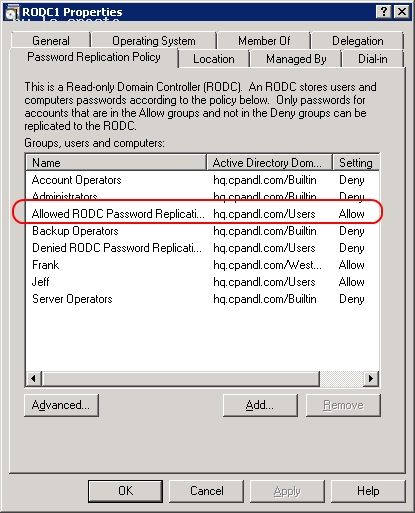
C:Documents and Settingsusernwz1Desktop1.PNG
http://technet.microsoft.com/en-us/library/cc730883%28v=ws.10%29.aspx Password Replication Policy When you initially deploy an RODC, you must configure the Password Replication Policy on the writable domain controller that will be its replication partner. The Password Replication Policy acts as an access control list (ACL). It determines if an RODC should be permitted to cache a password. After the RODC receives an authenticated user or computer logon request, it refers to the Password Replication Policy to determine if the password for the account should be cached. The same account can then perform subsequent logons more efficiently. The Password Replication Policy lists the accounts that are permitted to be cached, and accounts that are explicitly denied from being cached. The list of user and computer accounts that are permitted to be cached does not imply that the RODC has necessarily cached the passwords for those accounts. An administrator can, for example, specify in advance any accounts that an RODC will cache. This way, the RODC can authenticate those accounts, even if the WAN link to the hub site is offline.
Password Replication Policy Allowed and Denied lists Two new built-in groups are introduced in Windows Server 2008 Active Directory domains to support RODC operations. These are the Allowed RODC Password Replication Group and Denied RODC Password Replication Group. These groups help implement a default Allowed List and Denied List for the RODC Password Replication Policy. By default, the two groups are respectively added to the msDS-RevealOnDemandGroup and msDSNeverRevealGroup Active Directory attributes mentioned earlier. By default, the Allowed RODC Password Replication Group has no members. Also by default, the Allowed List attribute contains only the Allowed RODC Password Replication Group. By default, the Denied RODC Password Replication Group contains the following members: Enterprise Domain Controllers Enterprise Read-Only Domain Controllers Group Policy Creator Owners Domain Admins Cert Publishers Enterprise Admins Schema Admins Domain-wide krbtgt account By default, the Denied List attribute contains the following security principals, all of which are built-in groups: Denied RODC Password Replication Group Account Operators Server Operators Backup Operators Administrators The combination of the Allowed List and Denied List attributes for each RODC and the domain-wide Denied RODC Password Replication Group and Allowed RODC Password Replication Group give administrators great flexibility. They can decide precisely which accounts can be cached on specific RODCs. The following table summarizes the three possible administrative models for the Password Replication Policy. 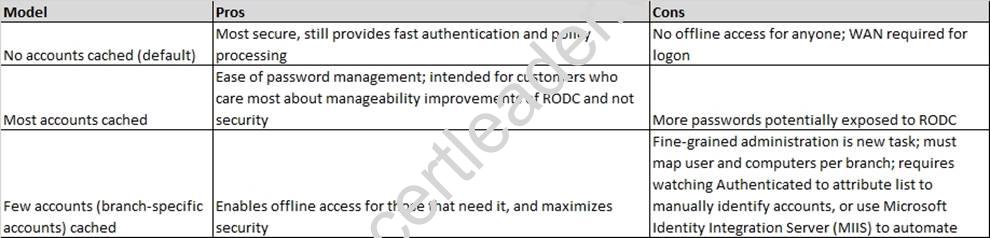
C:Documents and Settingsusernwz1Desktop1.PNG
NEW QUESTION 28
Your network consists of a single Active Directory domain. The domain contains 10 domain controllers. The domain controllers run Windows Server 2008 R2 and are configured as DNS servers.
You plan to create a new Active Directory-integrated zone.
You need to ensure that the new zone is only replicated to four of your domain controllers.
What should you do first?
- A. From the command prompt, run dnscmd and specify the /createdirectorypartition paramete
- B. Create a new delegation in the ForestDnsZones application directory partitio
- C. From the command prompt, run dnscmd and specify the /enlistdirectorypartition paramete
- D. Create a new delegation in the DomainDnsZones application directory partitio
Answer: A
Explanation:
Practically the same question as D/Q25 and K/Q17, different set of answers. To control which servers get a copy of the zone we have to store the zone in an application directory partition. That application directory partition must be created before we create the zone, otherwise it won't work. So that's what we have to do first. Directory partitions are also called naming contexts and we can create one using ntdsutil. Here I tried to create a zone with dnscmd /zoneadd. It failed because the directory partition I wanted to use did not exist yet. To fix that I used ntdsutil to create the directory partition dc=venomous,dc=contoso,dc=com. Note that after creating it a new naming context had been added. Then, after a minute or two, I tried to create the new zone again, and this time it worked. 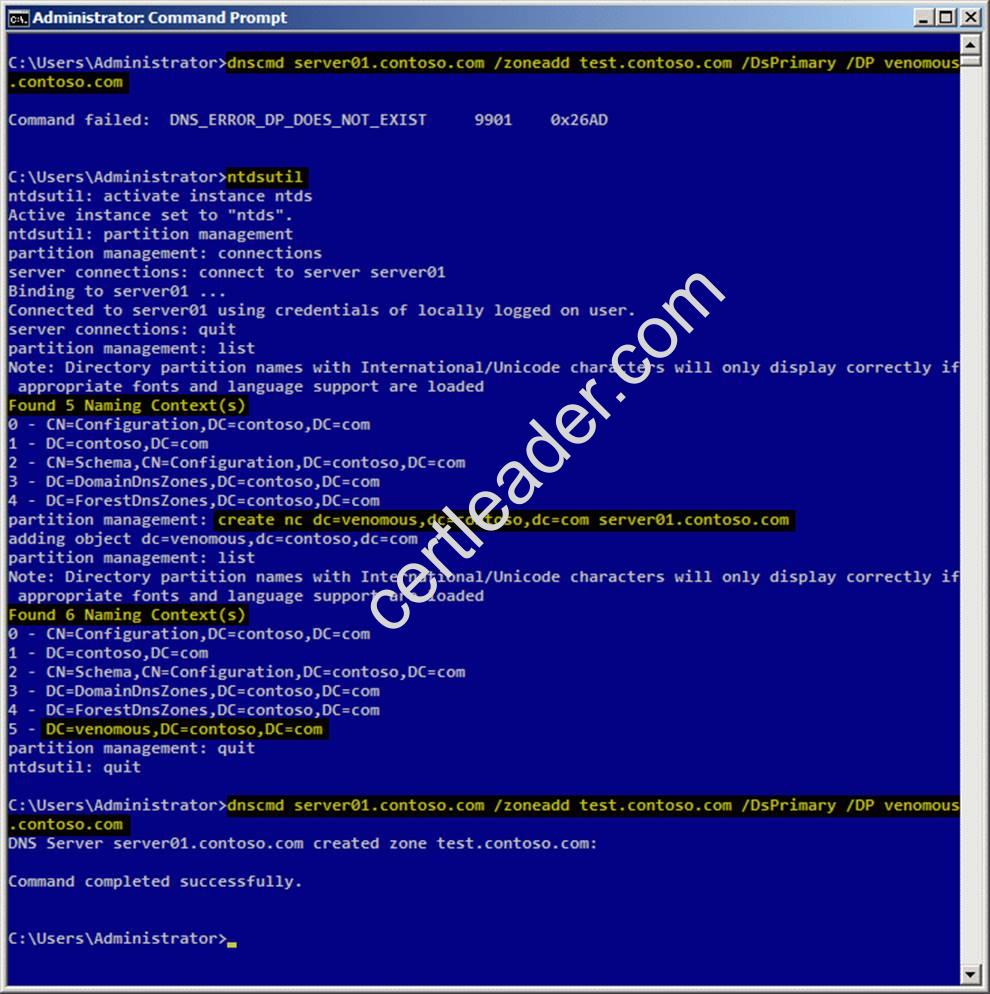
C:Documents and Settingsusernwz1Desktop1.PNG
Explanation 1: http://technet.microsoft.com/en-us/library/cc725739.aspx Store Data in an AD DS Application Partition You can store Domain Name System (DNS) zones in the domain or application directory partitions of Active Directory Domain Services (AD DS). An application directory partition is a data structure in AD DS that distinguishes data for different replication purposes. When you store a DNS zone in an application directory partition, you can control the zone replication scope by controlling the replication scope of the application directory partition. Explanation 2: http://technet.microsoft.com/en-us/library/cc730970.aspx Partition management Manages directory partitions for Active Directory Domain Services (AD DS) or Active Directory Lightweight Directory Services (AD LDS). This is a subcommand of Ntdsutil and Dsmgmt. Examples To create an application directory partition named AppPartition in the contoso.com domain, complete the following steps:
1. To open an elevated Command Prompt window, click Start, point to All Programs, click Accessories, rightclick Command Prompt, and then click Run as administrator.
2. Type: ntdsutil
3. Type: Ac in ntds
4. Type: partition management
5. Type: connections
6. Type: Connect to server DC_Name
7. Type: quit
8. Type: list The following partitions will be listed: 0 CN=Configuration,DC=Contoso,DC=com 1 DC=Contoso,DC=com 2 CN=Schema,CN=Configuration,DC=Contoso,DC=com 3 DC=DomainDnsZones,DC=Contoso,DC=com 4 DC=ForestDnsZones,DC=Contoso,DC=com
9. At the partition management prompt, type: create nc dc=AppPartition,dc=contoso,dc=com ConDc1.contoso.com
10. Run the list command again to refresh the list of partitions.
NEW QUESTION 29
Your network contains a single Active Directory domain. The domain contains an enterprise certification authority (CA).
You need to ensure that the encryption keys for e-mail certificates can be recovered from the CA database.
You modify the e-mail certificate template to support key archival.
What should you do next?
- A. Issue the key recovery agent certificate templat
- B. Run certutil.exe -recoverke
- C. Run certreq.exe-polic
- D. Modify the location of the Authority Information Access (AIA) distribution poin
Answer: A
Explanation:
http://technet.microsoft.com/en-us/library/cc770588.aspx
Identify a Key Recovery Agent
A key recovery agent is a person who is authorized to recover a certificate on behalf of an end user. Because the role of key recovery agents can involve sensitive data, only highly trusted individuals should be assigned to this role.
To identify a key recovery agent, you must configure the Key Recovery Agent certificate template to allow the person assigned to this role to enroll for a key recovery agent certificate.
NEW QUESTION 30
Your network contains an Active Directory domain named contoso.com.
You have an organizational unit (OU) named Sales and an OU named Engineering. Each OU contains over 200 user accounts.
The Sales OU and the Engineering OU contain several user accounts that are members of a universal group named Group1.
You have a Group Policy object (GPO) linked to the domain.
You need to prevent the GPO from being applied to the members of Group1 only.
What should you do?
- A. Modify the Group Policy permission
- B. Configure Restricted Group
- C. Configure WMI filterin
- D. Configure the link orde
- E. Enable loopback processing in merge mod
- F. Link the GPO to the Sales O
- G. Configure Group Policy PExplanation
- H. Link the GPO to the Engineering O
- I. Enable block inheritanc
- J. Enable loopback processing in replace mod
Answer: A
Explanation:
MS Press - Self-Paced Training Kit (Exam 70-640) (2nd Edition, July 2012) page 285, 286
Using Security Filtering to Modify GPO Scope
By now, you’ve learned that you can link a GPO to a site, domain, or OU. However, you might need to apply GPOs only to certain groups of users or computers rather than to all users or computers within the scope of the GPO. Although you cannot directly link a GPO to a security group, there is a way to apply GPOs to specific security groups. The policies in a GPO apply only to users who have Allow Read and Allow Apply Group Policy permissions to the GPO.
Each GPO has an access control list (ACL) that defines permissions to the GPO. Two permissions, Allow Read and Allow Apply Group Policy, are required for a GPO to apply to a user or computer. If a GPO is scoped to a computer (for example, by its link to the computer’s OU), but the computer does not have Read and Apply Group Policy permissions, it will not download and apply the GPO. Therefore, by setting the appropriate permissions for security groups, you can filter a GPO so that its settings apply only to the computers and users you specify.
Filtering a GPO to Apply to Specific Groups
To apply a GPO to a specific security group, perform the following steps:
4. Select the GPO in the Group Policy Objects container in the console tree.
5. In the Security Filtering section, select the Authenticated Users group and click Remove.
6. Click OK to confirm the change.
7. Click Add.
8. Select the group to which you want the policy to apply and click OK.
NEW QUESTION 31
......
P.S. Easily pass 70-640 Exam with 631 Q&As Passcertsure Dumps & pdf Version, Welcome to Download the Newest Passcertsure 70-640 Dumps: https://www.passcertsure.com/70-640-test/ (631 New Questions)