What Certified 1Z0-450 Preparation Is
Act now and download your Oracle 1Z0-450 test today! Do not waste time for the worthless Oracle 1Z0-450 tutorials. Download Far out Oracle Oracle Application Express 3.2: Developing Web Applications exam with real questions and answers and begin to learn Oracle 1Z0-450 with a classic professional.
Also have 1Z0-450 free dumps questions for you:
NEW QUESTION 1
Which three statements are true about a wizard-generated tabular form?
- A. Only allows you to update one record at a time.
- B. Allows you to add and update multiple records at a time.
- C. You can drill down to a detail record view.
- D. Allows you to add more than one record at a time.
- E. Only allows you to change the updateable column
Answer: BDE
Explanation:
A tabular form enables users to update multiple rows in a table. The Tabular Form Wizard creates a form to perform update, insert, and delete operations on multiple rows in a database table.
Reference: Oracle Application Express, Application Builder User’s Guide, Release 3.2, Creating a Tabular Form
NEW QUESTION 2
Which two actions are associated with page rendering?
- A. The process of generating a page from the Database.
- B. The process of submitting a page.
- C. A validation check on a user input field to verify that the entered value is numeric.
- D. A DML page process inserting records into a table after the Form Page is submitted.
- E. A computation which sets the session state with process point 'On Load - Before Heade
Answer: AE
Explanation:
A: The Application Express engine dynamically renders and processes pages based on data stored in Oracle database tables.
E: On Load: Before Header - Branching occurs before a page is rendered. This option displays another page instead of the current page or redirects the user to another URL or procedure.
Reference: Oracle Application Express, Application Builder User’s Guide, Release 3.2, How the Application Express Engine Renders and Processes Pages
NEW QUESTION 3
Marcie, Lauren, and Nancy are part of a project team to create an Inventory Application for ABC industries. The team members need to perform the following activities daily:
• Marcie: Modify application, manage user groups, and view usage reports of her workspace
• Nancy: Manage workspaces, and approve storage requests
• Lauren: Modify database objects, view session state and view application reports. What privileges would you assign to these three users?
- A. Marcie: Developer, Nancy: Developer, Lauren: Workspace Administrator
- B. Marcie: Workspace Administrator, Nancy: Developer, Lauren: Developer
- C. Marcie: Application Express Administrator, Nancy: Workspace Administrator, Lauren: Developer
- D. Marcie: Workspace Administrator, Nancy: Application Express Administrator, Lauren: Developer
- E. Marcie: Workspace Administrator, Nancy: Workspace Administrator, Lauren: Developer
Answer: C
Explanation:
Marcie needs to modify applications and manage users groups so she needs at least the Developer privileges and WorkSpace administrator (not A, not B, not D, not E).
Nancy needs to handle workspaces and approve storage requests so she needs at least the WorkSpace Administrator privileges or Application Express Administrator (not A, not B).
Lauren as a Developer would be fine.
Note: When setting up Application Express users at a large organization, you assign roles and privileges to specific users. The roles within Application Express include the following:
* Workspace administrators are users who perform administrator tasks specific to a workspace such as managing user accounts, monitoring workspace activity, and viewing log files. For this guide, you will be acting as the workspace administrator when setting up the development environment.
* Developers are users who create and edit applications. Developers can have their own workspace or share a workspace.
* End users have no development privileges. You define end users so that they can access applications that do
not use an external authentication scheme.
* Oracle Application Express administrators are superusers that manage an entire hosted instance using the Application Express Administration Services application.
NEW QUESTION 4
Choose three actions by which you can set a text item as read-only.
- A. Set the item as Text Field (Disabled, saves state)
- B. Set the item as Password
- C. Navigate to Page Definition > Edit that item > Navigate to Read Only section > Select "Always” from the Read Only Condition Type
- D. Set the item as Text Field (Disabled, does not save state)
- E. Set the item as Text Field (always submits page when Enter pressed)
Answer: ACD
Explanation:
A: Change Items to Display-onlyTo make the item P2_REC_CREATE_DATE display-only:
? Go to the Page Definition for page 2. Click Edit Page 2 on the Developer toolbar.
? Under Items, select the item P2_REC_CREATE_DATE.
? From the Display As list in the Name section, select Text Field (Disabled, saves state).
? Click Apply Changes.
C: Read Only Condition Type:
Defines conditions and expressions that determine if the item displays as read-only. Use this attribute to display certain items to a set of users as updatable, while displaying that same set of items to others users as nonupdatable. Reduces the need to code duplicate interfaces for different users.
D : For Application Item Protection you can use: / Restricted - May not be set from browser The item may not be altered using the URL or POSTDAT
A. Use this option when you want to restrict the way that the item value can be set to internal processes, computations, and so on. This attribute is applicable only to items that cannot be used as data entry items and is always observed even if Session State Protection is disabled.
Use this attribute for application items or for page items with any of these Display As types:
* Display as Text (escape special characters, does not save state)
* Display as Text (does not save state)
* Display as Text (based on LOV, does not save state)
* Display as Text (based on PLSQL, does not save state)
* Text Field (Disabled, does not save state)
* Stop and Start HTML Table (Displays label only)
NEW QUESTION 5
ABC Company wants to see which pages use the Reports - Standard template in a particular application. What three actions can be performed to find this information?
- A. Open each page in the application and review the templates section.
- B. Open the template and review the pages it references.
- C. Select the Utilization tab and view the pages referenced from the Shared Components > Templates page.
- D. Select the references link for the template on the > Template page.
- E. Preview the template to see the list of pages that reference i
Answer: ACD
Explanation:
A: This is an awkward and time consuming solution. C: Viewing Template Reports
Application Builder includes reports describing template utilization, subscription, published templates and edit history.
To view template reports for the current application:
? Navigate to the Templates page.
? You can narrow the display by making a selection from the following lists and clicking Go.
? To view template reports, click the following tabs:
Reference: Oracle Application Express Application Builder User's Guide, Viewing Template Reports
NEW QUESTION 6
View the Exhibit. To display only the names of all cities In Italy, you could perform which two tasks?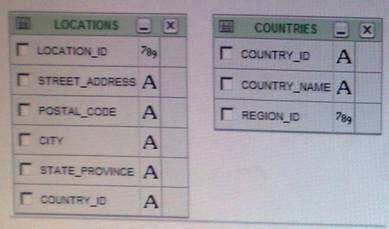
- A. Run the following SQL query in the SQL Commands worksheet are
- B. SELECT location
- C. City FROM locations, countriesWHERE countries.country_id=locations.country_id AND Countrie
- D. country name=f Italy’;
- E. Use Query Builder to select the countries and locations table
- F. Create a join between the two tables by using the country_id colum
- G. Then, select the city column in the locations table and country_name column in the countries tabl
- H. For the country_name, specify the condition = ' Italy’.
- I. Use Query Builder to select the countries and locations table
- J. Select the country_id column in both the tables and create a join between the
- K. Then, select the city column in the locations table and country_name column in the countries tabl
- L. For the country name, specify the condition ‘Italy’.
- M. Run the following SQL query in the SQL Commands worksheet are
- N. SELECT locations, city FROM locations, countriesWHERE countries.country_name=’Italy’;
- O. Use Query Builder to select the countries and locations table
- P. Create a join between the two tables by using the country_id colum
- Q. Then, select the city column in the locations table and country_name column in the countries tabl
- R. For the country_name, specify the condition =‘Italy'. Uncheck the Show check box for country_name.
Answer: AE
Explanation:
A (not D): The WHERE constraints " countries.country_id=locations.country_id" ensures that a correct join is made on the two tables.
Only the City column in displayed through the SELECT statement E: Join between the tables.
Put a condition on the Country_name. Only display the City column
NEW QUESTION 7
Which two actions are true about using standard and parent tabs?
- A. To use parent tabs, you must use a page template that supports them.
- B. You cannot apply authorization at standard tab level.
- C. You can resequence the display order of standard tabs.
- D. When you create or edit a standard tab, for the Tab Label attribute, you cannot use substitution value
Answer: AC
Explanation:
A: Before you can create parent and standard tabs, you must check that your default
template has positions defined for both standard and parent tabs using the appropriate substitution strings. You also must make sure you do not override this template at the page-level.
C: The Standard Tab Task list displays on the right side of the Tabs page. You can access the links on this list to rename a standard tab set, resequence the display order, associate pages with a tab set, create a new standard tab, or create a new standard tab set.
Note: Tabs
Tabs are an effective way to navigate between pages of an application. Application Builder includes two types of tabs: standard tabs and parent tabs.
An application having only one level of tabs uses a standard tab set. A standard tab set is associated with a specific page. You can use standard tabs to link users to other pages within your application. A parent tab set functions as a container to hold a
group of standard tabs. Parent tabs give users another level of navigation and context (or sense of place) within the application.
Reference: Oracle Application Express, Application Builder User’s Guide, Release 3.2, Using the Standard Tab Task List
NEW QUESTION 8
You can set the value of an item in your application by using which four methods?
- A. Form submission
- B. By using built-in substitution strings
- C. Using bind variables to reference session state of a specified item
- D. Application or page computations
- E. By invoking the f procedure in an HTTP request
Answer: ABDE
Explanation:
A: When the page is submitted, Oracle Application Express captures the value entered in the field and stores the value for future use.
B: You can use substitution strings in Application Builder in the following ways:
* Include a substitution string within a template to reference component values
* Reference page or application items using &ITEM. syntax
* Use built-in substitution strings to achieve a specific type of functionality
Application Builder supports a number of built-in substitution strings. You may need to reference these values to achieve specific types of functionality.
Example: APP_SESSIONAPP_SESSION is one of the most commonly used built-in substitution strings. You can use this substitution string to create hypertext links between application pages that maintain a session state by passing the session number. Note that you can also use the substitution string SESSION in place of APP_SESSION.
E: The "f" procedure is widely known and well covered in the Oracle APEX User Guide. The following example resets the value of the items THE_EMPNO and THE_DEPTNO. f?p=100:5:&APP_SESSION.::NO:THE_EMPNO,THE_DEPTNO
Note:
It can be used to create links between pages in your application using the following syntax: f?p=App:Page:Session:Request:Debug:ClearCache:itemNames:itemValues:PrinterFriendly
NEW QUESTION 9
You want to refer to a page by a name (or alias) Instead of by the page number in the application URL which action most accurately achieves the stated objective?
- A. Enter an alphanumeric alias in the Page Alias field on the Page Attributes page and refer this alias in theapplication URL as f?p=myapp:page_alias:&APP_SESSION.
- B. Enter an alphanumeric name in the Title field on the Page Attributes page and refer this title in the application URL.
- C. Create Navigation bar Entry for the page from the application's shared component
- D. Refer this navigation bar entry in the application URL.
- E. Use the built-in substitution string PAGE_ALIAS.
- F. As an instance administrator, log in to the Application Express Administration Service
- G. Go to Manage Services > Feature Configuration > Application Development and set the value to 'Yes' for Refer a page by name (or alias) in the application URL and click Apply Changes.
Answer: A
NEW QUESTION 10
What is page zero used for?
- A. To perform page processing
- B. To maintain session state values
- C. To translate application
- D. As a default login page
- E. To display a set of items or buttons on all pages in the application
Answer: E
Explanation:
Page type: Page Zero
Description: A page zero that functions as a master page. The Application Express engine renders all components you add to page zero
on every page within your application. You can further control whether the Application Express engine renders a component or runs a computation, validation, or process by defining conditions.
Reference: Oracle Application Express, Application Builder User’s Guide, Release 3.2
NEW QUESTION 11
You have a complex form that you want to break down into smaller sections with a horizontal line and a label in "bold". Which action achieves the stated objective?
- A. Include <br> <hr> <strong > </strong> tags In Region Source section of the region
- B. Place a Stop and start table item between form elements and set the label for each of these Stop and start table item using a label template
- C. Include multiple <br> tags between form elements
- D. Change the region template to "Form Region"
Answer: B
NEW QUESTION 12
After creating buttons in a region position, you cannot change the position of the buttons to
- A. Bottom of the region
- B. Above or below the region
- C. In any button position defined in the region template
- D. To the left or the right of the page title
- E. Among this region's Items
Answer: B
Explanation:
The position of the button must be within the region.
Create a button in a region position - Select this option to place the button in a region position. A region position is a position defined by a region template.
Note 1:
For Display Properties:
If the button position is Create a button in a region position:
* Sequence - Enter the sequence for this component. The sequence determines the order of evaluation.
* Position - Select a position for this button.
* Alignment - Select Right or Left.
Note 2: A region is a area on a page that serves as a container for content. Each page can have any number of regions. You control the appearance of a region through a specific region template. The region template controls the look of the region, the size, determines whether there will be a border or a background color, and what type of fonts display. A region template also determines the standard placement for any buttons placed in region positions.
You can use regions to group page controls (such as items or buttons).
Reference: Oracle Application Express Application Builder User's Guide, Creating Buttons Reference: Oracle Application Express Application Builder User's Guide,
Understanding Regions
NEW QUESTION 13
Which two statements is true relating to authentication in Oracle Application Express?
- A. It is a process of establishing user identity before the user can access an application.
- B. An authentication scheme can be specified for an entire application, page, or specific components Such as item, button and regions on a page.
- C. An authentication scheme prevents a user from accessing session state belonging to other users.
- D. An authentication scheme helps a user to reestablish their session when they log back into an application allowing them to bookmark the application.
- E. An authentication scheme can only be applied to one applicatio
Answer: AC
Explanation:
A: Authentication establishes the identity of each user who accesses your application. Authentication is the process of establishing each user's identify before they can access your application. Authentication may require a user identify a user name and password or could involve the use of digital certificates or a secure key.
C: When running custom authentication, Oracle Application Express attempts to prevent two improper situations:
* Intentional attempts by a user to access session state belonging to someone else. However, users can still type in an arbitrary application session ID into the URL.
* Inadvertent access to a stale session state (probably belonging to the same user from an earlier time). This
would commonly result from using bookmarks to application pages.
Reference: Oracle Application Express, Application Builder User’s Guide, Release 3.2, Using Preconfigured Authentication Schemes
NEW QUESTION 14
In your Orders application, you created a 30 Pie Flash chart page to display products by category. You provided the following query:
Select null link, category_name# count (*) from (SELECT CASE WHEN (category_id between 10 and 19) THEN 'Television1 WHEN (category_id between 20 and 29) THEN 'Computer1 ELSE 'Others1
END category_name
VMM new_product. Group by category_name order by 1
View the Exhibit. What action should you perform to display the chart title and the total number of products under each category without using custom XML?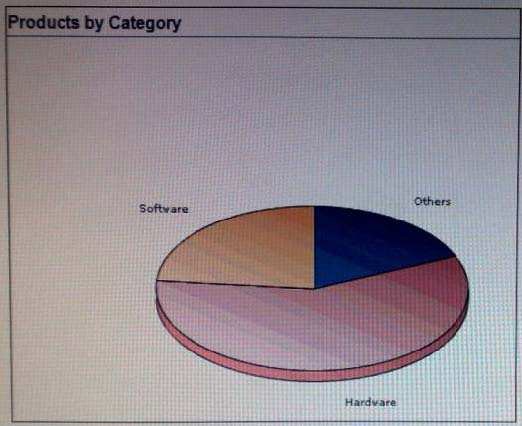
- A. Edit the Flash Chart region to select the Show Values check box.
- B. Modify the query to display the value and edit the Flash Chart region to display the chart title
- C. Edit the Flash Chart region to specify the chart title and select the Show Values check box.
- D. Edit the Flash Chart region to specify the chart titl
Answer: C
NEW QUESTION 15
Before the application Installation can proceed, the Installer checks whether the user has required system privileges or not. Where would you specify the required system privileges?
- A. Supporting Objects > Build Options
- B. Supporting Objects > Validations
- C. Supporting Objects > Install
- D. Supporting Objects > Prerequisites
- E. Supporting Objects > System Requirements
Answer: D
NEW QUESTION 16
Which three actions can be performed by a Workspace Administrator?
- A. Monitor workspace activity
- B. Manage workspace to schema assignments
- C. Manage user accounts
- D. Approve workspace requests
- E. View usage reports of workspace
Answer: ACE
Explanation:
Developers can create and edit applications and view developer activity, session state, workspace activity(A), application, and schema reports. Workspace administrators additionally can create and edit user accounts (C), manage groups, and manage development services.
NEW QUESTION 17
You can use Query Builder when creating which three region types?
- A. Interactive Report
- B. SQL Report
- C. Master-Detail Form
- D. Form on a Table
- E. Flash Chart
Answer: ABE
Explanation:
Query Builder enables you to define queries by dragging and dropping tables and easily create relationships between objects.
A: Interactive Report - Creates an interactive report based on a custom SQL SELECT statement you provide. For assistance in writing the SQL query, click the Query Builder button.
B: SQL Report - Creates a report based on a custom SQL SELECT statement or a PL/SQL function returning a SQL SELECT statement that you provide. For assistance in writing the SQL query, click the Query Builder button.
E: See step 8a) below.
Adding a Flash Chart to an Existing Page To add a flash chart to an existing page:
1. Navigate to the Page Definition. See "Accessing a Page Definition" on page 5-2. 2. Under Regions, click the Create icon.
The Create Region Wizard appears. 3. Select Chart and click Next.
4. For Region, select Flash Chart.
5. For Display Attributes
6. On Chart Preview, configure the chart attributes. Click Update to refresh the preview image.
7. Click Next.
8. For Source:
a. Specify a query by either:
– Entering a SQL query in the field provided.
– Clicking the Build Query button. When the Build Chart Query Wizard appears, follow the on-screen instructions.
b. Specify relevant chart attributes. To learn more, click the item label.
9. Click Create Region.
Reference: Oracle Application Express, Application Builder User’s Guide, Release 3.2, Creating a Page from the Application Home Page
NEW QUESTION 18
Which three are valid process types of a Page Process?
- A. Automatic Row Processing (DML)
- B. PL/SQL
- C. Clear Cache for Items (ITEM, ITEM, ITEM)
- D. Static Assignment
- E. Form Pagination
Answer: ABE
Explanation:
A: Process Category Data Manipulation:
Data Manipulation process types are frequently used by wizards to support data manipulation language (DML) actions. Application Builder supports the following declarative
B: Process Category PL/SQL:
Runs the PL/SQL you provide. Use this process type to execute a block of PL/SQL entered directly into the process or to simply call an existing API.
E: Process Category: Form Pagination
Implements pagination through the detail records associated with a master detail form.
Note: Processes are logic controls used to execute data manipulation language (DML) or PL/SQL. Processes are executed after the page is submitted.
Reference: Oracle Application Express, Application Builder User’s Guide, Release 3.2, Creating a Page Process
NEW QUESTION 19
Which two statements are true when navigating on a Page Definition window?
- A. an LOV appears only if it is associated with an item on that page.
- B. an Authorization scheme appears only if it is associated with a region on that page
- C. A Region Template appears only if it is associated with an item on that page.
- D. The last updated history for the page would appear.
- E. Images that are referred in the regions on the page appea
Answer: AD
Explanation:
A: The Referenced Components page lists page components and shared components associated with the current page.
Note: A list of values (LOV) is a static or dynamic definition used to display a specific type of page item, such as a radio group, check box, popup list, or select list. LOVs can be static (that is, based on a set of predefined display and return values) or dynamic (based on SQL queries that select values from tables). Once created, an LOV can then be referenced by one or more page items.
You define LOVs at the application level by running the LOV Wizard and adding them to the List of Values repository.
D: The History page displays a history of recent changes to the currently selected page by developer (or user), application, page number, modification date, component, and
action.
Reference: Oracle Application Express, Application Builder User’s Guide, Release 3.2, Understanding the Page Definition
NEW QUESTION 20
Which two actions are true about creating a form based on a table with a report?
- A. This wizard builds two pages, the first page for the report and the second page for the form.
- B. The first page provides users with the ability to update the selected table or view.
- C. This report and form combination is based on a single table or view.
- D. The second page enables users to specify the row to be updated.
- E. This report and form combination can be based on more than one table or vie
Answer: AC
Explanation:
A: Form Page Type: Form on a Table with Report
Descriptipon: Creates two pages. One page displays a report. Each row provides a link to the second page to enable users to update each record.
C (not E): Form on a Table with Report.
This option creates two pages, a report and form, based on a single table or view.
NEW QUESTION 21
The Order Totals page in the Orders application includes a link to January 2009 that should link to a calendar view of the order totals for that month. But if you click January 2009, it displays the calendar for the current month instead of January 2009. What action should you perform to rectify this?
- A. Modify the display attributes of the calendar.
- B. Edit the P<n>_CALENDAR_DATE hidden item and replace the default value with 20090101.
- C. Edit the P<n>_CALENDAR_DATE hidden item to specify a condition.
- D. Edit the P<n>_CALENDAR_DATE hidden item to replace the default value with 20090101 and select Static Text with Session State Substitutions for the default value type.
Answer: D
NEW QUESTION 22
......
Thanks for reading the newest 1Z0-450 exam dumps! We recommend you to try the PREMIUM Certshared 1Z0-450 dumps in VCE and PDF here: https://www.certshared.com/exam/1Z0-450/ (52 Q&As Dumps)