Microsoft 70-347 Preparation Labs 2021
Cause all that matters here is passing the Microsoft 70-347 exam. Cause all that you need is a high score of 70-347 Enabling Office 365 Services exam. The only one thing you need to do is downloading Passleader 70-347 exam study guides now. We will not let you down with our money-back guarantee.
NEW QUESTION 1
You are the Office 365 administrator for your company. The company has a single Active Directory Domain Services domain. As part of the Office 365 deployment, the company is preparing to deploy Office Telemetry.
You need to disguise file names and document titles, while still collecting the telemetry dat a.
What should you do?
- A. In the Default Domain policy, set the Turn on data uploading for the Telemetry agent Group Policy setting to Disabled.
- B. Run the tdadm.exe command and set the threshold parameter to 1.
- C. In the Telemetry Dashboard, obfuscate the document name, title, and path.
- D. In the Telemetry Dashboard, apply a label named Private to employees.
Answer: C
Explanation:
In Manage privacy settings in Telemetry Dashboard, you can learn about Telemetry Dashboard settings that help you protect user privacy by disguising file names and titles or by preventing data for selected applications or solutions from being reported.
Figure: Three ways to configure privacy settings in Telemetry Dashboard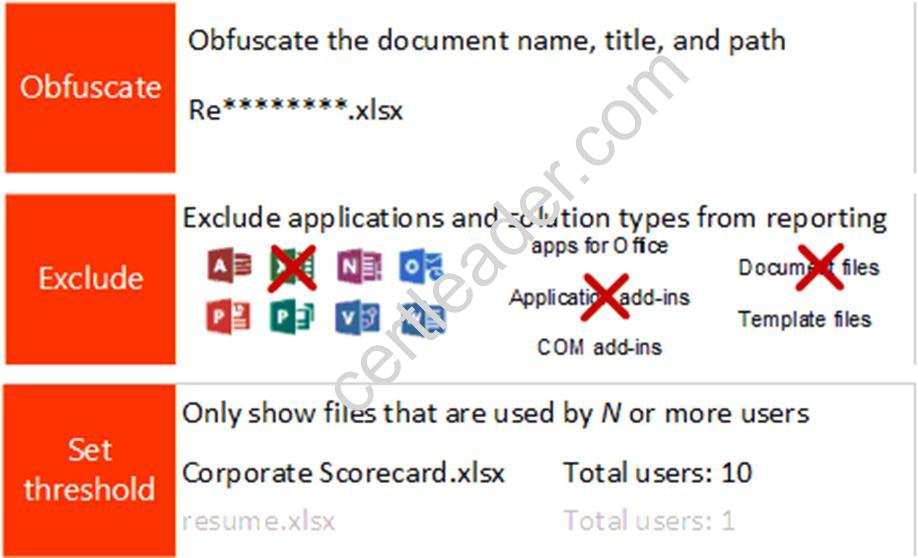
References:
https://technet.microsoft.com/en-us/library/jj863580.aspx
Case Study: 2
Provision SharePoint Online site collections
NEW QUESTION 2
Your company is planning to migrate to Microsoft Exchange Online. The company employs 1,000 people, each with a mailbox currently located on Exchange 2010 on-premises. You estimate that it will take a minimum of four weeks to migrate all mailboxes from on-premises Exchange to Exchange Online.
The company has the following migration requirements:
During the migration, do not change the existing Microsoft Outlook profiles and .ost files used by the employees.
Ensure that email messages sent between on-premises mailboxes and online mailboxes during the migration are secure.
Do not send email messages between on-premises mailboxes and online mailboxes over the Internet in plain text.
You need to select the migration strategy that meets the requirements. Which migration strategy should you use?
- A. Hybrid migration only
- B. IMAP migration followed by staged migration
- C. Staged migration only
- D. Staged migration followed by remote move migration
Answer: A
Explanation:
You can use a hybrid migration to migration from Exchange 2010 to Exchange Online.
Note: In the Deployment Assistant, a hybrid deployment is when you create a new Exchange Online Exchange organization in Microsoft Office 365 for enterprises and then connect it to your existing on-premises Exchange 2010 organization by configuring Active Directory synchronization and using the Hybrid Configuration wizards.
NEW QUESTION 3
DRAG DROP
You are an Office 365 specialist for a consulting company.
Your company has been hired by several companies to migrate their legacy email solutions to Office 365.
You need to recommend mailbox migration strategies for the scenarios described in the following table.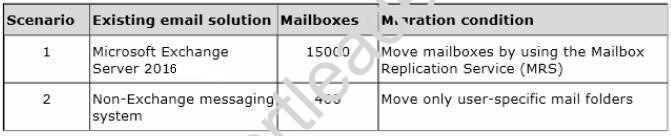
Which strategies should you recommend? To answer, drag the appropriate migration types to the correct targets. Each migration type may be used once, more than once, or not at all. You may need to drag the split bar between panes or scroll to view content.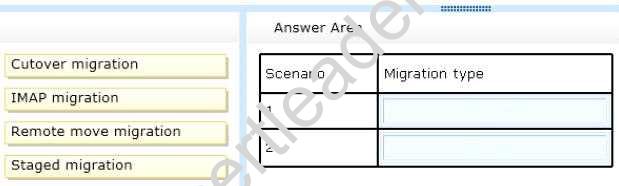
- A. Mastered
- B. Not Mastered
Answer: A
Explanation:
For the Microsoft Exchange Server 2010 mailboxes, we can use a remote move migration. When the mailboxes are moved in the remote move operation, the Mailbox Replication Service is used. This is the same service that is used when moving mailboxes between mailbox servers in an on-premise environment. In this question, the Exchange on-premise and Exchange Online environments will be configured in a hybrid configuration. That will enable us to move mailboxes to Exchange Online in the same way you would move a mailbox to another local mailbox server.
A remote move migration is used to migrate on-premises Exchange mailboxes to Exchange Online in an Exchange hybrid deployment. You must have an Exchange hybrid deployment to use a remote move migration. With a hybrid deployment, you get the following capabilities:
For a non-Exchange messaging system, the only migration option available is the IMAP migration.
In an IMAP migration, the contents of users' mailboxes on an IMAP messaging system are migrated to their Exchange Online mailboxes. Here are some requirements and considerations for using an IMAP migration:
References: http://technet.microsoft.com/en-us/library/jj863291(v=exchg.150).aspx
NEW QUESTION 4
DRAG DROP
A company has an Office 365 tenant. You plan to implement Skype for Business Online for all users. You are evaluating client and conferencing policies.
You need to identify the default limits for file transfers and users to configure the appropriate policies for users.
What are the default limits? To answer, drag the appropriate limits to the correct feature. Each feature may be used once, more than once, or not at all. You may need to drag the split bar between panes or scroll to view content.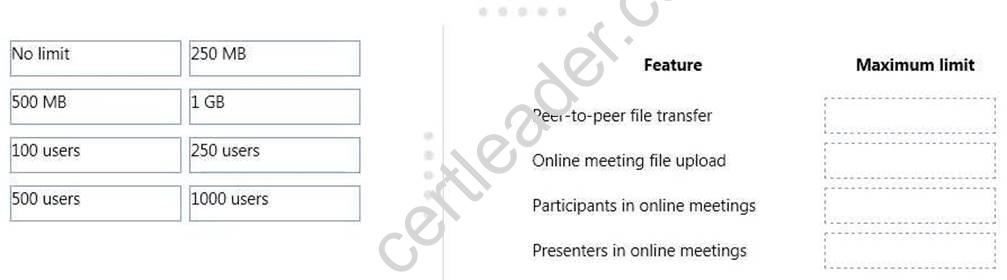
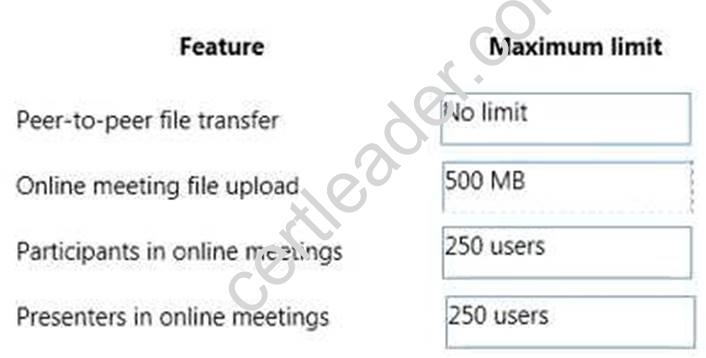
Peer-to-peer limits across Office 365 options
- A. Mastered
- B. Not Mastered
Answer: A
Explanation:
References:
https://technet.microsoft.com/en-us/library/skype-for-business-online-limits.aspx
NEW QUESTION 5
You manage an Office 365 tenant that uses an Enterprise E1 subscription.
You need to ensure that users are informed when Exchange Online Protection quarantines email messages.
Which Windows PowerShell cmdlet should you run?
- A. Enable-JournalRule
- B. New-RetentionPolicyTag
- C. Start-ManagedFolderAssistant
- D. Set-CsUser
- E. Set-CsPrivacyConfiguration
- F. Set-HostedContentFilterPolicy
- G. Set-MalwareFilterPolicy
- H. Set-MailboxJunkEmailConfiguration
Answer: G
Explanation:
Use the Set-MalwareFilterPolicy cmdlet to modify malware filter policies in your organization.
Example 1
This example modifies the malware filter policy named Contoso Malware Filter Policy with the following settings:
Set-MalwareFilterPolicy -Identity "Contoso Malware Filter Policy" -Action DeleteMessage - EnableInternalSenderAdminNotifications $true -InternalSenderAdminAddress admin@contoso.com
References:
https://technet.microsoft.com/en-us/library/jj215689(v=exchg.150).aspx
NEW QUESTION 6
You need to configure the external communication settings for Skype for Business. What should you do?
- A. Turn on external communication for all domains except for blacklisted domains.
- B. Turn on external communication only for whitelisted domains.
- C. Allow Skype for Business to communicate with Skype users outside of the organization.
- D. Disable external communication for all domains.
Answer: C
Explanation:
References: https://docs.microsoft.com/en-us/SkypeForBusiness/set-up-skype-for-business- online/allow-users-to-contact-external-skype-for-business-users?ui=en-US&rs=en- US&ad=US
NEW QUESTION 7
HOTSPOT
You are the Office 365 administrator for your company.
An employee with the user name User1 requests a shared mailbox named Sales1. User1 must be able to send messages from the Sales1 mailbox.
You need to create and configure the online mailbox.
How should you complete the relevant Windows PowerShell script? To answer, select the correct answer from each list in the answer area.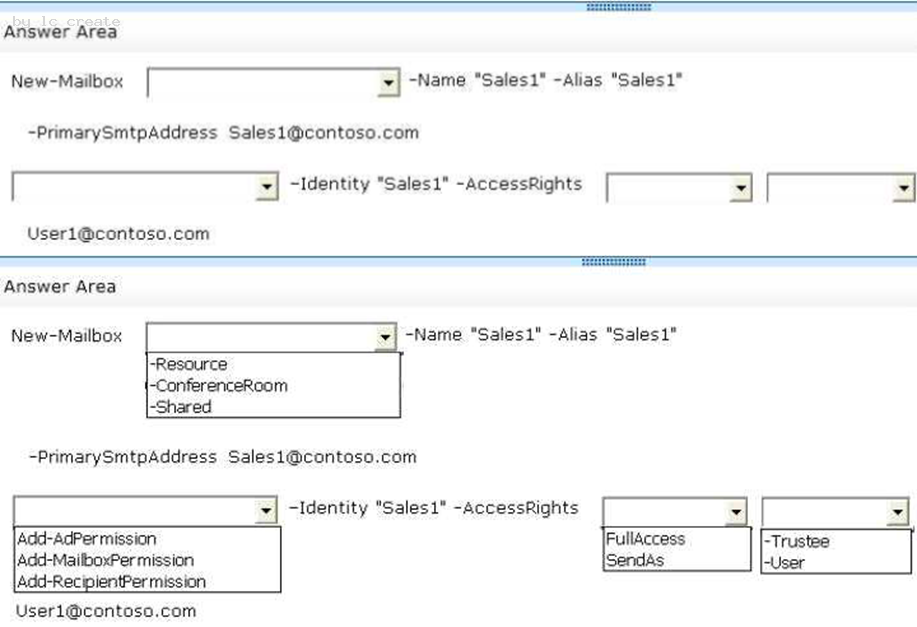
- A. Mastered
- B. Not Mastered
Answer: A
Explanation:
We use the New-Mailbox cmdlet to create a new mailbox. Then we use the Add- RecipientPermission cmdlet to grant the SendAs permission on the mailbox to User1@contoso.com.
Box1: We use the –Shared option to create a shared mailbox with the name of Sales1.
Box 2. We use the Add-RecipientPermission to add a permission (in this case SendAs permission) to the Sales1 mailbox.
Box 3. We need to select the SendAs permission to enable User1 to send messages from the Sales1 mailbox
Box 4. We need the –Trustee option to enable us to specify that we’re granting the SendAs permission to a user (user1@contoso.com).
References:
https://technet.microsoft.com/en-gb/library/ff935839(v=exchg.150).aspx
NEW QUESTION 8
You are the Office 365 administrator for a company.
You must implement the Skype for Business Web App for all employees.
Which two features can you implement? Each correct answer presents a complete solution.
- A. Instant messaging
- B. Video Calls
- C. Audio Calls
- D. Presence information
- E. Scheduled meetings
Answer: AC
Explanation:
A: Skype for Business Web App provides HD video conferencing, IM in meetings, high- fidelity desktop, application, and presentation viewing, desktop sharing, whiteboard, lobby, and presenter access controls. In addition, Skype for Business Web App now includes PC- based audio and video.
C: Normally the first time you join a Skype Meeting from Skype for Business Web App, you're connected to the meeting audio by using a Skype Call through your device's headset or mic and speakers.
NEW QUESTION 9
Your company has a hybrid deployment of Office 365. You need to identify which certificate is used for token signing between the on-premises environment and Office 365. Which tool should you use?
- A. The Exchange Management Console.
- B. The AD FS 2.0 Management console.
- C. The Active Directory Domains and Trusts snap-in.
- D. The Office 365 portal.
- E. The Certificates snap-in.
Answer: B
Explanation:
AD FS creates a self-signed certificate by default. You are able to modify this certificate to a CA-issued certificate by using the AD FS management snap-in. Therefore, it stands to reason that to identify which certificate is used for token signing between the on-premises environment and Office 365, you would have to access the AD FS 2.0 Management console.
References: https://technet.microsoft.com/en-us/library/hh563848(v=exchg.150).aspx
NEW QUESTION 10
This is a case study. Case studies are not timed separately. You can use as much exam time as you would like to complete each case. However, there may be additional case studies and sections on this exam. You must manage your time to ensure that you are able to complete all questions included on this exam in the time provided.
To answer the questions included in a case study, you will need to reference information that is provided in the case study. Case studies might contain exhibits and other resources that provide more information about the scenario that is described in the case study. Each question is independent of the other questions in this case study.
At the end of this case study, a review screen will appear. This screen allows you to review your answers and to make changes before you move to the next section of the exam. After you begin a new section, you cannot return to this section.
To start the case study
To display the first question in this case study, click the Next button. Use the buttons in the left pane to explore the content of the case study before you answer the questions. Clicking these buttons displays information such as business requirements, existing environment, and problem statements. Note that the information displayed on the All information tab is identical to the information displayed on the subsequent tabs. When you are ready to answer a question, click the Question button to return to the question.
Overview
Fabrikam, Inc. is a medical billing clearing house that recently migrated from on-premises services to Office 365. The company has two offices. One office is in Atlanta, and one office is in Chicago. Accounting, IT, and claims department users are located in the Atlanta office. Enterprise E3 licenses are assigned to all users. The current Site Collection administrator is Admin1.
Sales department users are located in the Chicago office only. The sales department plans to offer quarterly sales reviews with existing and potential customers. Up to 2,000 people are expected to attend each meeting.
All users have access to the following Office 365 services: Business Requirements
Document sharing policy
Documents shared externally must not contain personally identifiable information (PII). Sharing for any documents that contain PII must be blocked automatically.
Quarterly review meetings must be recorded and made available online for later viewing. Office applications
You identify the following requirements for supporting Office applications on all corporate devices:
Atlanta office
You identify the following requirements to support users in the Atlanta office. Sales department
You identify the following requirements to support users in the sales department: Accounting department
The accounting department must be able to set permissions for their own sites. User accounts named User1 and Admin1 must be notified if the storage for accounting users reaches 80 percent of the 1 terabyte (TB) limit.
You are unable to configure storage for the accounting department. The Site Collection ribbon for the accounting department site collection is shown below.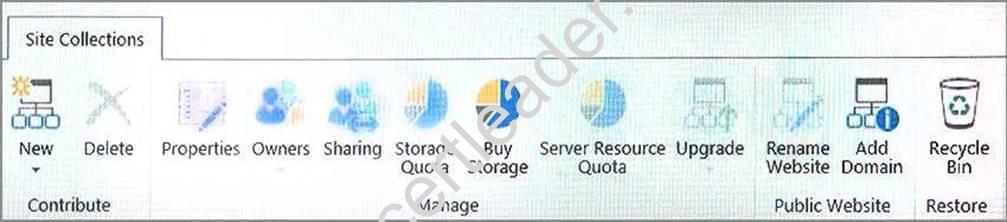
Claims department
The claims department frequently receives email that contain attachments. The approved list of attachment types includes:
Other attachment types must be removed from email messages. If an attachment is removed, the original sender must be notified that their attachment was removed.
IT department
The IT department must be able to create eDiscovery cases. You must use eDiscovery to search email and conversations in the tenant.
eDiscovery case
The IT department must manage an eDiscovery case for the claims department. You must add the following user accounts as members of the case:
The case must have a hold placed on the Claims1 mailbox.
Note: This question is part of a series of questions that use the same scenario. For your convenience, the scenario is repeated in each question. Each question presents a different goal and answer choices, but the text of the scenario is exactly the same in each question in this series.
After you answer a question in this section, you will NOT be able to return to it. As a result, these questions will not appear in the review screen.
You need to configure the sales meetings.
Solution: Add the PSTN Calling add-on to the sales department users. Does the solution meet the goal?
- A. Yes
- B. No
Answer: B
Explanation:
Calling Plans are an add-on telephone service that, when combined with Phone System in Office 365, can become the phone system for your entire organization. A Calling Plan provides the people in your business with a primary phone number, and lets them make and receive phone calls outside of your organization.
From Scenario: Quarterly review meetings must be recorded and made available online for later viewing.
References: https://support.office.com/en-us/article/What-are-Calling-Plans-in-Office-365- 3dc773b9-95e0-4448-b2f1-887c54022429
Case Study: 7
A. Datum Corporation
OverView
Datum Corporation has a single-domain Active Directory forest. The company has the following locations:
Each location has four member servers that run Windows Server 2021 Standard. A_ Datum Corporation has on-premises deployments of Microsoft SQL Server, SharePoint Server, Exchange Server, and SCCM. The Exchange deployment is configured for hybrid coexistence with Exchange Online. The company plans to retire the on-premises Exchange servers. The on-premises SharePoint deployment will continue to be operated as an Intranet site for A. Datum Corporation employees.
All corporate-owned systems are managed by using SCCM.
Office 365
All departments and projects are represented by Office 365 groups.
You plan to deploy Microsoft Teams with all add-on components disabled. You plan to use Microsoft PowerApps to build custom business apps that can be used across web and mobile environments by the corporate users. Your company publishes several PowerApps templates for use by employees. You plan to deploy Microsoft StaffHub using a default configuration. AlI add-ons and external features for Teams are disabled.
Requirements: Office Applications
You identify the following requirements for Office 365 applications and services:
* All users must have the ability to run Office 365 ProPlus. Only members of the software development team must be able to use Microsoft Access.
* All department managers must be able to create team sites in SharePoint Online. You must be able to independently configure usage limits for each SharePoint Online site collection.
* All users must have an Office 365 license to access StaffHub.
* You must that employees who do not have Teams installed can view conversations by using a different Office application.
* Employees must be able to create apps from PowerApp templates without the need for administrative intervention.
* You must configure Office 365 to review all outbound communications from members of the marketing group. All communication reviews will be sent to the legal team.
Users
All user accounts in Office 365 must be created through direct administrative action. Automated account creation is not permitted.
Desktop Management
All BYOD devices must be managed by SCCM using Microsoft Intune. All software installations must be managed by SCCM. All desktop computers must run Windows 10 Enterprise.
Server Distribution
All services must be offered, managed, and configured on servers in the location where the activity takes place. You must use software that does not require specific licensing whenever possible. AJI software required to support services offered must be installed and tested prior to installing any components of the applications that will use it.
Data Privacy Customer data
Information about customers and this information must be protected. You must prevent customer id numbers, account numbers and phone numbers from inclusion in SharePoint site content. You must ensure that employees can include this information in emails.
Skype for Business Online
Skype for Business Online must only show an employees presence status to others in the company and people the user has specifically added to Skype for Business Online.
Employees must be able to send mail and chat with any employees from any company. Employees must be allowed to set up meetings with other employees. They must not be able to hold webinars or other meetings with people outside the organization.
NEW QUESTION 11
DRAG DROP
You have an Office 365 tenant that uses an Enterprise E3 subscription.
You must prevent five specific users from using Skype for Business Online to send instant messages to external users. All other users must be able to send instant messages to both internal and external users.
You need to configure the environment.
Which three actions should you perform in sequence? To answer, move the appropriate actions from the list of actions to the answer area and arrange them in the correct order.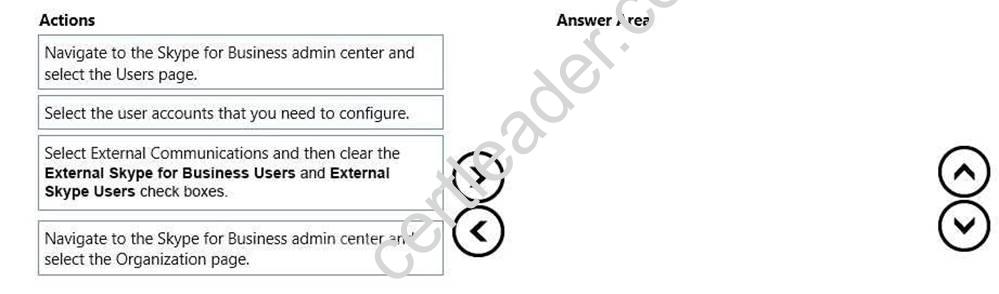
- A. Mastered
- B. Not Mastered
Answer: A
Explanation:
To block external communications for specific individuals, you should go to the Users page in the Skype for Business Admin center, select the users whose settings you want to disable, and then choose Edit.
After you enable external excommunications for everyone in your company, you can selectively block external communications for specific individuals using these steps. You then choose External communications, and then clear the options as appropriate before saving the changes.
References: https://support.office.com/en-us/article/Admins-Configure-Skype-for-Business- settings-for-individual-users-77b26eac-8228-4161-ba9f-733b187bd836
NEW QUESTION 12
You are the Office 365 administrator for a company. All accounts include the user’s city, office, department, manager, and job title. Users must be able to view all user accounts from a specific department in a single list. The list must not be used to send email to the department.
You need to configure Office 365. What should you do?
- A. In the Microsoft Exchange admin center, create a public Office 365 group.
- B. In the Microsoft Exchange admin center, create a shared mailbox.
- C. Connect to Microsoft Exchange Online by using Windows PowerShell and create an address list.
- D. In the Microsoft Exchange admin center, create a private Office 365 group.
Answer: C
Explanation:
References: https://technet.microsoft.com/en-us/library/bb125036(v=exchg.150).aspx
NEW QUESTION 13
Contoso, Ltd. has an Office 365 Enterprise E3 plan. Contoso uses the domain contoso.com for email and instant messaging (IM).
Contoso requires that website visitors who go to http://contoso.com be directed to the company's Microsoft SharePoint Online public website.
You need to configure Office 365 to redirect the website requests without affecting the company's email or IM.
What should you do?
- A. In the SharePoint admin center, rename the public website to http://contoso.com.
- B. In the Office 365 admin center, change the domain purpose for contoso.com to SharePoint.
- C. On the authoritative DNS servers, add a CNAME record for contoso.com.
- D. In the Office 365 admin center, add a new subdomai
- E. Then set up redirection for http://contoso.com to the subdomain.
Answer: D
Explanation:
In this question, we need to redirect users to the SharePoint public website by using a root domain, Contoso.com. If we were using www.contoso.com, we could simply configure a CNAME record in DNS. However, this question states that “You need to configure Office 365 to redirect the website requests without affecting the company's email or IM”. Email uses MX records. If you have a CNAME record at the root level of a domain, the MX records will not work.
To use a root domain, we need to configure a redirect. First we need to add a subdomain such as www.contoso.com in the Office 365 admin center then configure the redirect to the subdomain.
“If you want users to see your site when they type just the root domain, contoso.com, contact your DNS hosting provider and ask if they have a URL redirection service to direct traffic from contoso.com to www.contoso.com. Most providers offer URL redirection, and you can check their documentation to learn how to set it up.”
References: https://support.office.com/en-us/article/Rename-your-SharePoint-Online-Public-Website-address-to-use-your-custom-domain-3403c6d5-aaa6-4775-a1cc-c6bda0a99986?ui=en-US&rs=en-US&ad=US
NEW QUESTION 14
DRAG DROP
You are the Office 365 administrator for a company. The company is currently migrating from a hosted POP3 email solution to Microsoft Exchange Online. The company maintains extensive lists of external contacts in several Microsoft Excel workbooks.
You plan to import all the external contact information from the workbooks into the Exchange Online Global Address List (GAL). The external contacts must not be able to sign in to your company's Windows Azure Active Directory service.
You consolidate all the external contact information into a file named ExternalContacts. You need to import the file into the GAL.
How should you complete the relevant Windows PowerShell script? To answer, drag the appropriate command segments to the correct targets. Each command segment may be used once, more than once, or not at all. You may need to drag the split bar between panes or scroll to view content.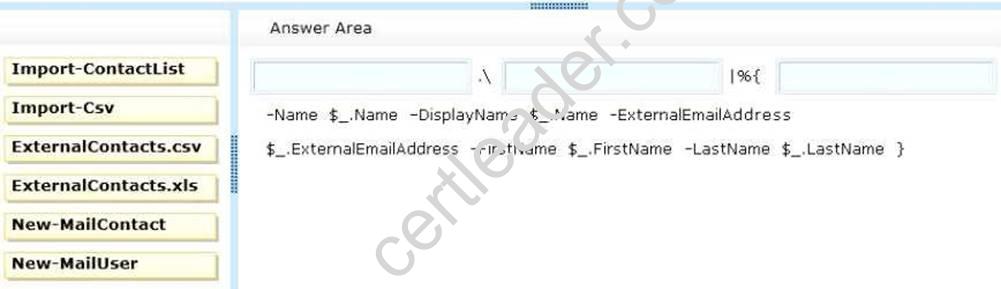
- A. Mastered
- B. Not Mastered
Answer: A
Explanation:
Box 1: We use the Import-CSV cmdlet to import the list of names in the ExternalContacts.csv file.
Box 2: We specify the filename of the csv file to import.
Box 3: We use the New-MailContact cmdlet to create new mail-enabled contacts in Active Directory based on the names in the csv file.
A mail contact is described as, “A mail-enabled Active Directory contact that contains information about people or organizations that exist outside the Exchange organization. Each mail contact has an external email address. All messages sent to the mail contact are routed to this external email address.”
Mail contacts are listed in the Exchange Online Global Address List (GAL) but they cannot sign in to the Azure Active Directory service.
References: http://community.office365.com/en-us/w/exchange/579.aspx
NEW QUESTION 15
DRAG DROP
You are the Office 365 administrator for your company. User1 has shared a link to edit a
document with an external user.
The shared document must not be modified.
You need to update the sharing permissions so that the external user can display, but not modify, the document.
In which order should you perform the actions? To answer, move all actions from the list of actions to the answer area and arrange them in the correct order.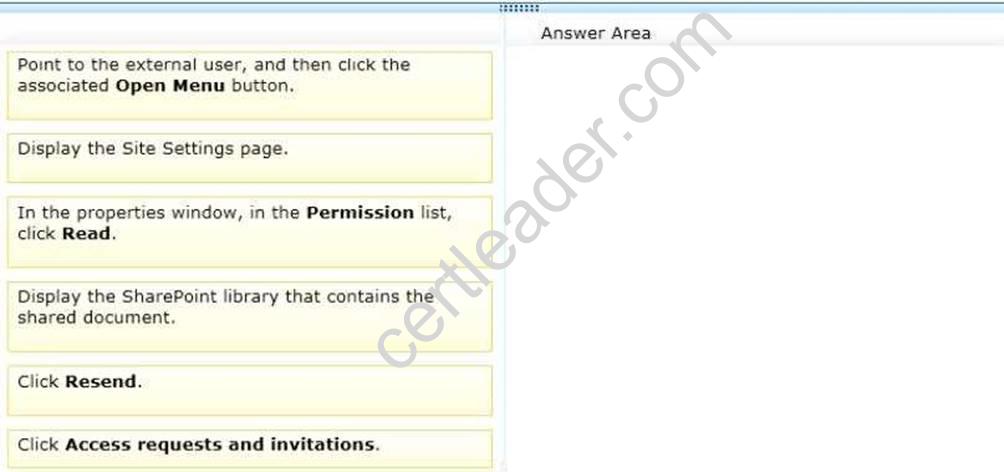
- A. Mastered
- B. Not Mastered
Answer: A
Explanation:
The external user has already been invited to access the document. Therefore, the name of the external user will be listed under Access Requests and Invitations in the Site Settings page of the document library. We can select the user and modify the permissions to the document to Read only. After modifying the permission, we need to resend the invitation.
NEW QUESTION 16
Note: This question is part of a series of questions that present the same scenario. Each question in the series contains a unique solution that might meet the stated goals. Some question sets might have more than one correct solution, while others might not have a correct solution.
After you answer a question in this section, you will NOT be able to return to it. As a result, these questions will not appear in the review screen.
You need to recommend a solution to implement the planned change for the email addresses of the New York office managers.
Solution: Populate the attributes in Active Directory and implement directory synchronization.
Does this meet the goal?
- A. Yes
- B. No
Answer: B
Explanation:
This option will not demote the current primary SMTP address, and add a new primary SMTP address.
NEW QUESTION 17
You are the Office 365 administrator for a financial services firm. Financial analysts at the firm crate reports that contain sensitive information.
Financial analysts must be able to securely share investment reports with their customer. You must enable sharing with a specific person and prevent others from accessing the content.
You need to recommend a content sharing strategy. What should you do?
- A. Store the reports in a Microsoft OneDrive for Business folde
- B. Send customers a guest link to the document.
- C. Encrypt documents by using Office 365 Message Encryption.
- D. Store the reports in a Microsoft SharePoint Online document librar
- E. Invite customers to sign in to the document library by using a Microsoft account or a work or school account.
- F. Store the reports in a Microsoft SharePoint Online document librar
- G. Send customers a guest link to the document.
Answer: D
Explanation:
References: https://support.office.com/en-us/article/Share-SharePoint-files-or-folders-in-Office-365-1fe37332-0f9a-4719-970e-d2578da4941c
NEW QUESTION 18
You manage an Office 365 tenant that uses an Enterprise E1 subscription. A user takes an extended leave of absence.
The user reports that email messages in the Junk Email folder are deleted before they can read the messages.
You need to ensure that email messages for the user’s Junk Email folder are deleted after 60 days.
Which Windows PowerShell cmdlet should you run first?
- A. Enable-JournalRule
- B. New-RetentionPolicyTag
- C. Start-ManagedFolderAssistant
- D. Set-CsUser
- E. Set-CsPrivacyConfiguration
- F. Set-HostedContentFilterPolicy
- G. Set-MalwareFilterPolicy
- H. Set-MailboxJunkEmailConfiguration
Answer: B
Explanation:
Use the New-RetentionPolicyTag cmdlet to create a retention tag. This cmdlet is available in on-premises Exchange Server 2021 and in the cloud-based service. It applies to Exchange Online and Exchange Server 2021. Retention tags are used to apply message retention settings to folders and items in a mailbox.
Example: This example creates the retention policy tag Finance-DeletedItems for the Deleted Items default folder. When applied to a mailbox as a part of a retention policy, the tag permanently deletes items of all types in the Deleted Items folder in 60 days.
New-RetentionPolicyTag "Finance-DeletedItems" -Type DeletedItems -RetentionEnabled
$true -AgeLimitForRetention 60 – References:
https://technet.microsoft.com/en-us/library/dd335226(v=exchg.160).aspx
NEW QUESTION 19
You are the Office 365 administrator for your company.
You need to configure Microsoft Lync Online to disable alerts for voicemail and instant messages to Windows Phones.
What should you do?
- A. Use the Set-CsHostedVoiceMailPolicy Windows PowerShell cmdlet.
- B. Use the Set-CsPushNotificationConfiguration Windows PowerShell cmdlet.
- C. In the Lync admin center, select the Display presence information only to a user's contactsoption.
- D. Use the Set-CsUser Windows PowerShell cmdlet.
Answer: B
Explanation:
Push notifications enable people using Apple iPhones or Windows Phones to receive notifications about events even when Lync is suspended or running in the background. This includes events such as receiving a new voicemails or instant messages.
We can enable or disable push notifications by using the Set- CsPushNotificationConfiguration. In this question, we need to disable push notifications for Windows Phones by using the EnableMicrosoftPushNotificationService = false parameter.
NEW QUESTION 20
DRAG DROP
Your company has an Office 365 subscription. A user has a desktop computer and has been assigned an E3 license. The user plans to travel to multiple branch offices and will use a shared desktop computer at each branch office. The user will not have administrative privileges on the branch office computers.
You need to ensure that the user has access to all features of Microsoft Word 2013 and Excel 2013 at the branch offices.
Which three actions should you perform in sequence? To answer, move the appropriate actions from the list of actions to the answer area and arrange them in the correct order.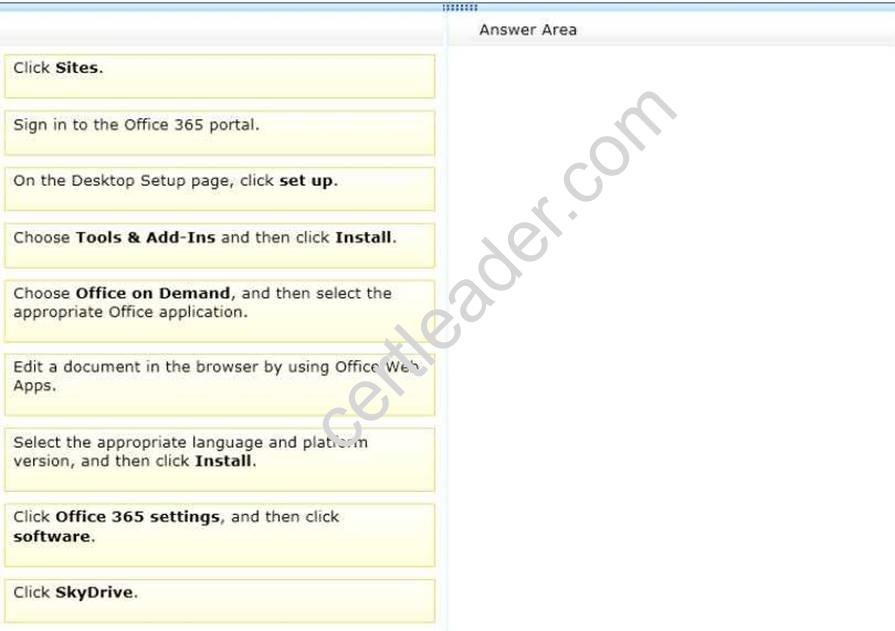
- A. Mastered
- B. Not Mastered
Answer: A
Explanation:
Office on Demand enables you to ‘download’ Office applications from Office 365 by using
Microsoft's click-to-run technology. With an Office 365 subscription, you can log in to your Office 365 account from any computer with an Internet connection then select which Office application you want to use.
Office on Demand is described by Microsoft as an Office 365 feature that provides access to productivity apps such as Excel, Word and PowerPoint on a PC "that doesn't have the latest
version of Office installed locally." The application gets streamed down to the local device via Microsoft's click-to-run technology. After the Office on Demand session is over, the application is wiped automatically from the machine. With Office on Demand, Office 365 subscribers can be assured of gaining access to Office apps on the go by just using an available, Internet-connected PC.
References: http://winsupersite.com/office-365/tip-use-office-demand
NEW QUESTION 21
DRAG DROP
An organization has a single Exchange 2021 server. The organization plans to migrate to Exchange Online.
You have the following requirements:
You must perform a test migration to Exchange Online with a subset of the mailboxes.
These mailboxes must be migrated back on-premises if the test fails.
Users must sign in to Office 365 by using the same password that they use for on-premises services.
You must use the fewest additional servers possible to complete the migration. You need to complete the test migration.
Which four actions should you perform in sequence? To answer, move the appropriate
actions from the list of actions to the answer area and arrange them in the correct order.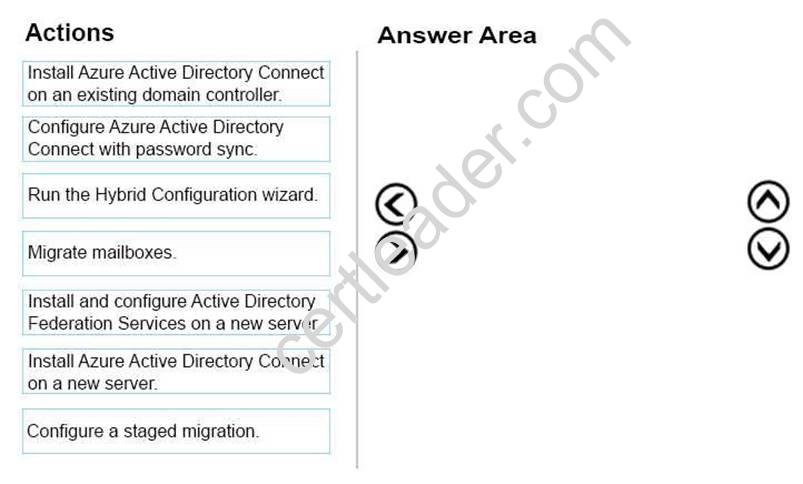
- A. Mastered
- B. Not Mastered
Answer: A
Explanation:
Box1
The target computer for installing AAD Sync can be stand-alone, a member server or a domain controller. Because the requirements state that fewest additional servers must be used, the domain controller option works.
Box2
The Password synchronization feature of the AAD Sync tool allows for the end-user to use the same password on-premises and in the cloud but only manage it in one location.
Box3
The Hybrid Configuration Wizard must be downloaded and run via an existing Exchange server in your on-premises organization.
Box4
When you move mailboxes between the on-premises and Exchange Online organizations, you use migration batches to perform the remote mailbox move request.
References:
https://docs.microsoft.com/en-us/azure/active-directory/connect/active-directory-aadconnect- prerequisites
https://docs.microsoft.com/en-us/azure/active-directory/connect/active-directory- aadconnectsync-whatis
https://technet.microsoft.com/en-us/library/jj200787(v=exchg.150).aspx
NEW QUESTION 22
HOTSPOT
You manage an Office 365 tenant for Contoso, Ltd.
Guest links for the SharePoint Online tenant are disabled.
You need to enable guest links for the contoso-my.sharepoint.com site collection.
In the SharePoint admin center, in which two locations can you enable guest links? To answer, select the appropriate links in the answer area.
NOTE: Each correct selection is worth one point.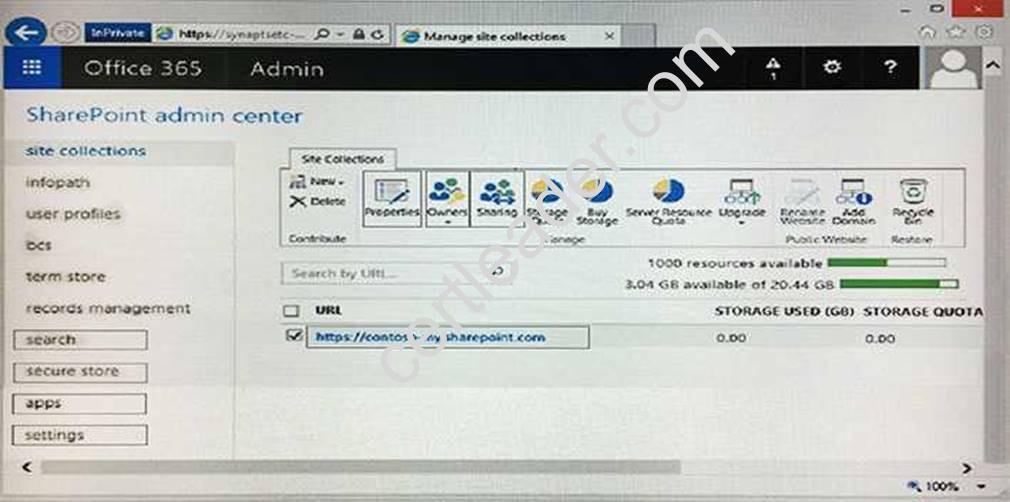
- A. Mastered
- B. Not Mastered
Answer: A
Explanation:
External sharing is controlled at both global settings that affect all of SharePoint Online and the site collection level. The tenant-level settings determine what options are available at the site collection level.
References: https://support.office.com/en-us/article/Turn-external-sharing-on-or-off-for- SharePoint-Online-6288296a-b6b7-4ea4-b4ed-c297bf833e30
NEW QUESTION 23
Note: This question is part of a series of questions that present the same scenario. Each question in the series contains a unique solution. Determine whether the solution meets the stated goals.
You have an Office 365 subscription. All user mailboxes have an archive mailbox. A new compliance policy has the following requirements:
All email messages that are more than one year old must be moved to the archive mailbox.
All email messages that are more than two years old must be deleted. You create two default policy tags and one retention policy.
You need to implement the compliance policy.
Solution: You run the Set-RetentionPolicy cmdlet and specify the –isDefault $true parameter. Does this meet the goal?
- A. Yes
- B. No
Answer: B
Explanation:
The Set-RetentionPolicy –isDefault parameter is reserved for internal Microsoft use. References: https://technet.microsoft.com/en-us/library/dd335196(v=exchg.160).aspx
NEW QUESTION 24
Note: This question is part of a series of questions that present the same scenario. Each question in the series contains a unique solution. Determine whether the solution meets the stated goals.
You need to modify the existing environment to meet the technical requirement for Outlook on the web.
Solution: You run the Set-CASMailbox command. Does this meet the goal?
- A. Yes
- B. No
Answer: A
Explanation:
The Set-CASMailbox command can be used to disable Outlook Web App. This example disables Outlook Web App for the mailbox of Yan Li.
Set-CASMailbox -Identity "Yan Li" -OWAEnabled $false
From scenario: The executive management at Contoso wants to prevent users from accessing their Exchange Online mailbox by using Outlook on the web.
Note: You can use the EAC or the Shell to enable or disable Outlook Web App for a user mailbox. When Outlook Web App is enabled, a user can use Outlook Web App to send and receive email. When Outlook Web App is disabled, the mailbox will continue to receive email messages, and a user can access it to send and receive email by using a MAPI client, such as Microsoft Outlook, or with a POP or IMAP email client, assuming that the mailbox is enabled to support access by those clients.
References: https://technet.microsoft.com/en-us/library/bb124124(v=exchg.150).aspx
NEW QUESTION 25
You are the Office 365 administrator for your company.
You need to configure Microsoft Skype for Business Online to disable alerts for voicemail and instant messages to Windows Phones.
What should you do?
- A. In the Lync admin center, disable public IM connectivity.
- B. Use the Set-CsPushNotificationConfiguration Windows PowerShell cmdlet.
- C. Use the Set-CsOnlineUser Windows PowerShell cmdlet.
- D. In the Lync admin center, select the Display presence information only to a user's contacts option.
Answer: B
Explanation:
Push notifications, in the form of badges, icons, or alerts, can be sent to a Windows Phone even when the mobile application is inactive. Push notifications notify a user of events such as a new or missed IM invitation and voice mail. You can enable or disable push notifications for Windows Phone devices by using either Lync Server 2013 Control Panel or Lync Server 2013 Management Shell.
To disable push notifications for Windows Phone set the value of the EnableMicrosoftPushNotificationService property to False ($False). For example:
Set-CsPushNotificationConfiguration -Identity "site:Redmond" - EnableMicrosoftPushNotificationService $False
References:
https://technet.microsoft.com/en-us/library/jj688162(v=ocs.15).aspx
NEW QUESTION 26
DRAG DROP
Your company uses Office 365 and Microsoft SharePoint Online. You are the SharePoint Online administrator.
You need to set up resource monitoring and quota monitoring for the environment.
What should you do? To answer, drag the appropriate terms to the correct targets. Each term may be used once, more than once, or not at all. You may need to drag the split bar between panes or scroll to view content.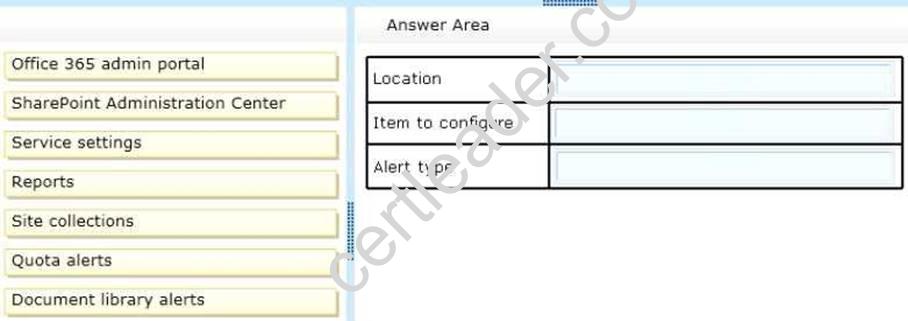
- A. Mastered
- B. Not Mastered
Answer: A
Explanation:
To set the server resource quota
You have to sign in to Office 365 as a global admin or SharePoint admin. You must then navigate to the s SharePointAdmin center and access the site Collections tab. You then Click Server Resource Quota, and enter a maximum number of resources in the set server resource quota dialog box. Finally, you select the box to send an email when resource usage nears the limit, and enter the percentage of the limit that you want to use as the warning level. References:
https://support.office.com/en-gb/article/Manage-SharePoint-Online-server-resource-quotas- for-sandboxed-solutions-90e4eaaa-899a-48d6-b850-f272366bf8cc
NEW QUESTION 27
......
Thanks for reading the newest 70-347 exam dumps! We recommend you to try the PREMIUM Passcertsure 70-347 dumps in VCE and PDF here: https://www.passcertsure.com/70-347-test/ (314 Q&As Dumps)